Talk with our engineers by joining the new Onehouse community Slack!
TL;DR
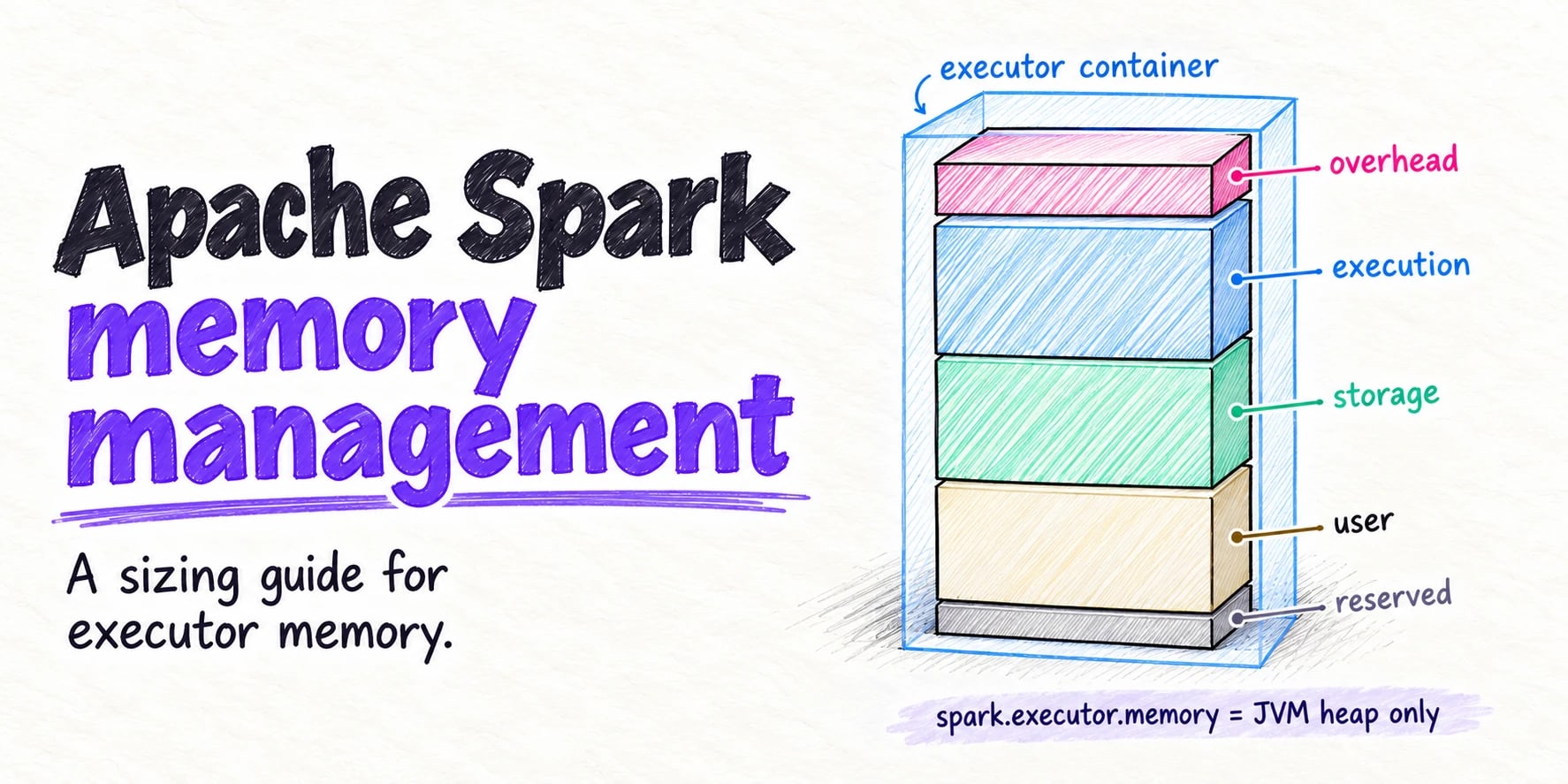
spark.executor.memory sets only the JVM heap, 1g by default. The container that YARN or Kubernetes enforces adds spark.executor.memoryOverhead (by default the larger of 10% of the heap and 384 MiB), plus off-heap and PySpark memory when you set them. Inside the heap, Spark reserves 300 MiB; 60% of the rest is unified memory for execution and storage, and 40% is user memory that Spark does not track. Each running task can claim between 1/2N and 1/N of execution memory, so more cores per executor means less memory per task. For an out-of-memory error, change partitions, cores per executor, overhead, or caching before you raise the heap.
Spark memory management decides whether an executor finishes its tasks, spills to disk, or gets killed halfway through a stage. The setting people reach for first, spark.executor.memory, controls less than its name suggests: it sets the executor’s JVM heap and nothing else. The container that Apache Hadoop™ YARN or Kubernetes enforces is larger than the heap, and the memory that runs out is not always inside it.
This guide explains how Apache Spark™ divides executor memory, turns node hardware into an executor configuration, covers what YARN and Kubernetes add, and shows how to read a memory failure in the Spark UI. Every default was checked against the Apache Spark 4.2.0 configuration docs, and the screenshots come from a real run on Spark 4.2.0.
What spark.executor.memory actually sets
Spark executor memory is more than one setting. The configuration docs describe spark.executor.memory as the “amount of memory to use per executor process,” with a default of 1g and, as of 4.2.0, a minimum of 450m. It becomes the executor JVM’s maximum heap. Memory outside the heap, such as metaspace, thread stacks, native buffers, off-heap pages, and Python workers, has to fit in other settings.
On YARN and Kubernetes, the docs say the container size “is determined by the sum of spark.executor.memoryOverhead, spark.executor.memory, spark.memory.offHeap.size and spark.executor.pyspark.memory”:
container memory = spark.executor.memory          # the JVM heap
                 + spark.executor.memoryOverhead  # max(10% heap, 384 MiB)
                 + spark.memory.offHeap.size      # 0 unless off-heap is on
                 + spark.executor.pyspark.memory  # not set by default
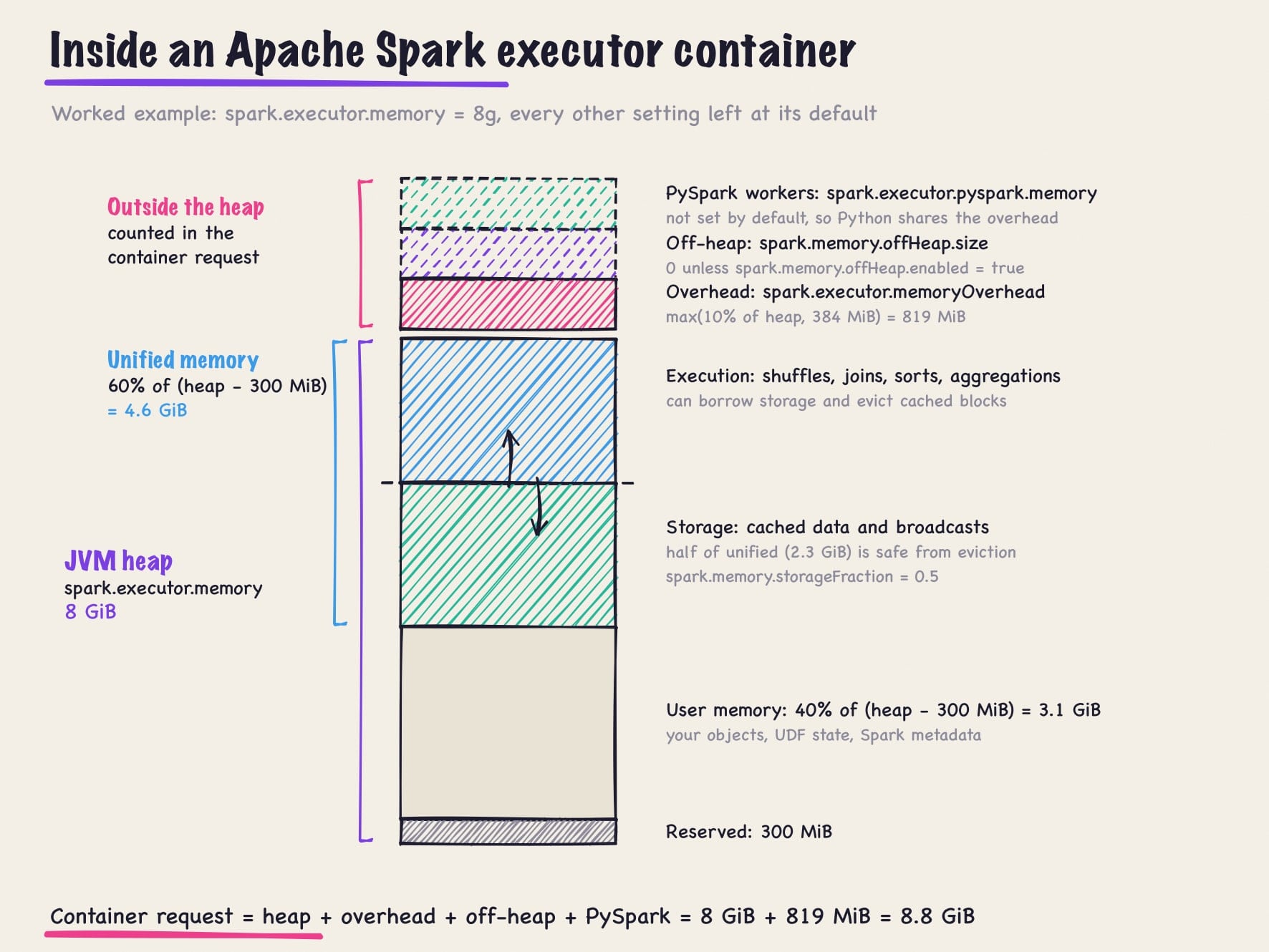
With spark.executor.memory=8g and everything else at its default, the request is 8 GiB of heap plus 819 MiB of overhead: 8.8 GiB.
How Spark memory management works inside the heap
Since Spark 1.6 (SPARK-10000), one unified memory manager splits the heap into three regions:
- Reserved memory: a fixed 300 MiB, set in the UnifiedMemoryManager source. It is why 450m is the smallest heap Spark accepts.
- Unified memory:
spark.memory.fraction(default 0.6) of the heap minus 300 MiB, shared by storage (cached blocks and broadcast variables) and execution (buffers for shuffles, joins, sorts, and aggregations). - User memory: the rest. The tuning guide says “the rest of the space (40%) is reserved for user data structures, internal metadata in Spark, and safeguarding against OOM errors.”
The boundary between storage and execution moves. spark.memory.storageFraction (default 0.5) marks the share of unified memory where cached blocks are safe. In the tuning guide’s words, “Execution may evict storage if necessary, but only until total storage memory usage falls under a certain threshold (R),” and “storage may not evict execution.” When execution still cannot get enough memory, its operators spill to disk.
User memory is the region that surprises people. Spark does not track it, so a UDF that builds a large map or the object graph from groupByKey can fill the heap while the unified pool looks fine. Articles that give user memory as 25% of the heap describe Spark 1.6, when spark.memory.fraction was 0.75; the default became 0.6 in Spark 2.0 (SPARK-15796).
For the 8 GiB example, 7,892 MiB is usable: 4.6 GiB of unified memory (2.3 GiB protected for storage) and 3.1 GiB of user memory. You can check this in the Spark UI, where the Executors tab’s Storage Memory capacity is the unified pool. For a 1g executor it reads 434.4 MiB, exactly (1,024 − 300) × 0.6.
Memory outside the heap
spark.executor.memoryOverhead accounts for “VM overheads, interned strings, other native overheads, etc.” It defaults to the heap times spark.executor.memoryOverheadFactor (0.10), with a floor of spark.executor.minMemoryOverhead (384 MiB), a setting added in Spark 4.0. The docs note the option “is currently supported on YARN and Kubernetes.” On Kubernetes, the factor “defaults to 0.10 except for Kubernetes non-JVM jobs, which defaults to 0.40,” so the 0.40 applies to PySpark and SparkR jobs only.
spark.memory.offHeap.enabled and spark.memory.offHeap.size (default false and 0) let Spark allocate execution and storage pages outside the heap, beyond the reach of garbage collection. The size is added to the container request, and the docs warn it “has no impact on heap memory usage,” so shrink the heap if the total must stay fixed.
spark.executor.pyspark.memory is not set by default, and then “Spark will not limit Python’s memory use and it is up to the application to avoid exceeding the overhead memory space shared with other non-JVM processes.” Set it when pandas UDFs or Python UDFs hold large amounts of data in the Python worker; YARN and Kubernetes then add it to the request.
spark.yarn.executor.memoryOverhead still works in 4.2.0, but it has been a deprecated alias since Spark 2.3. Use spark.executor.memoryOverhead.
How tasks share executor memory
An executor runs one task per core (spark.task.cpus defaults to 1), and all running tasks draw from the same execution pool. The ExecutionMemoryPool source sets the split: “If there are N tasks, it ensures that each task can acquire at least 1 / 2N of the memory before it has to spill, and at most 1 / N.”
For an 8 GiB heap with nothing cached:
| Cores per executor | Execution memory per task |
|---|---|
| 1 | 2.3 to 4.6 GiB |
| 2 | 1.2 to 2.3 GiB |
| 5 | 0.46 to 0.92 GiB |
| 8 | 0.29 to 0.58 GiB |
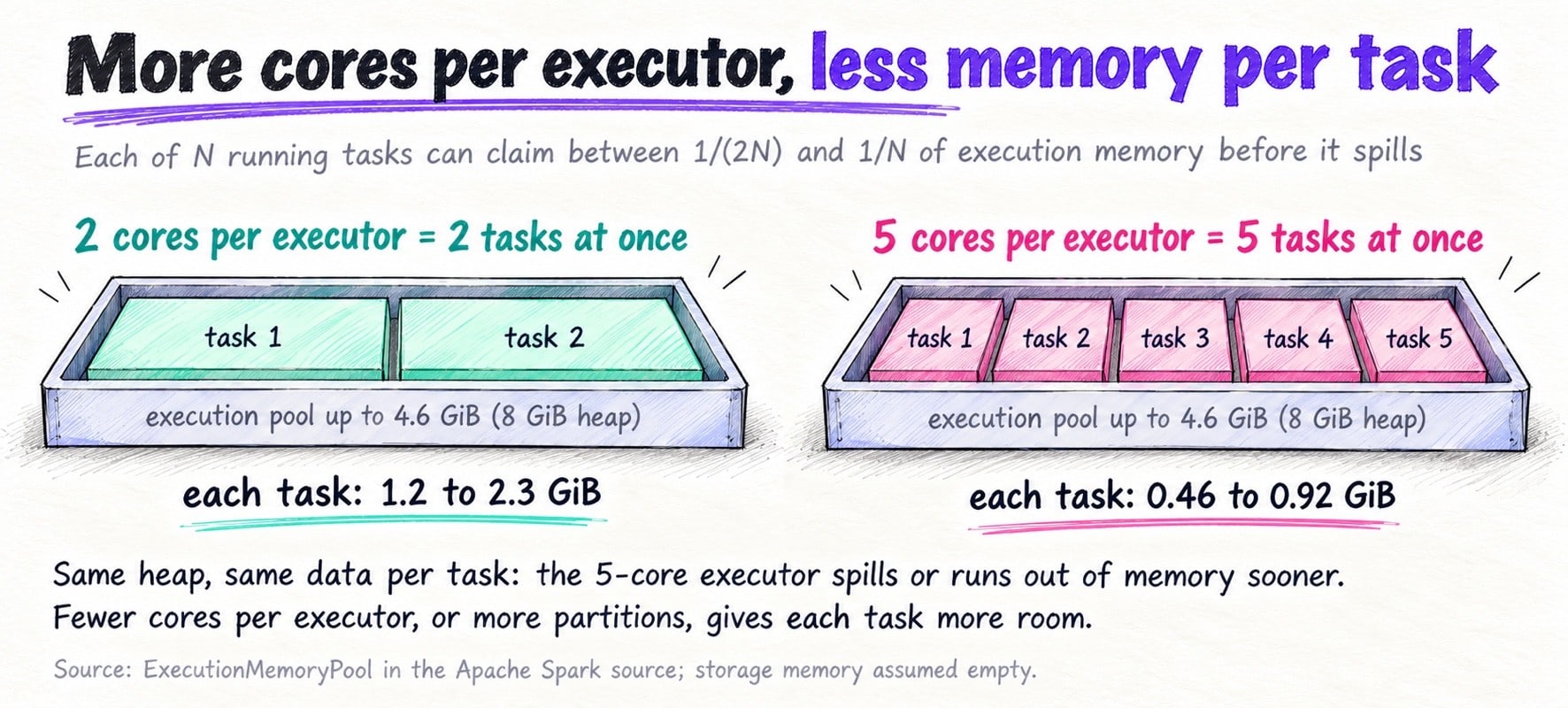
Adding cores without adding heap shrinks every task’s share, so a sort that fit at 2 cores can spill at 5. The tuning guide gives the simplest fix for a task that runs out of memory: “increase the level of parallelism, so that each task’s input set is smaller.”
Sizing executors step by step
Spark executor tuning starts from the node, not the job. This walkthrough uses a YARN cluster of 10 worker nodes, each with 16 vCPUs and 128 GiB of memory.
- Reserve capacity for the OS and node daemons. Here YARN offers 15 cores and 120 GiB per node to containers (
yarn.nodemanager.resource.cpu-vcoresandyarn.nodemanager.resource.memory-mb). - Pick cores per executor. The 5-core rule comes from Cloudera’s 2015 post, How-to: Tune Your Apache Spark Jobs, Part 2, written for Spark 1.3, which found that “at most five tasks per executor can achieve full write throughput” to HDFS. Capital One’s guide repeats it as “3-5 CPU cores on each executor.” On object storage the HDFS reason no longer applies, but per-task memory and garbage collection still favor a moderate count. This example uses 5.
- Derive executors per node: 15 ÷ 5 = 3.
- Split node memory: 120 GiB ÷ 3 = 40 GiB per container.
- Subtract overhead: 40 GiB ÷ 1.10 ≈ 36.4, so
spark.executor.memory=36g. Overhead is 3,686 MiB and the request is 40,550 MiB, which YARN rounds up to a multiple ofyarn.scheduler.minimum-allocation-mb(1,024 MiB by default): exactly 40 GiB. - Check memory per task: unified memory is about 21.4 GiB, so each of 5 tasks gets 2.1 to 4.3 GiB.
- Count executors: 10 × 3 = 30. In YARN cluster mode the driver runs in the ApplicationMaster container, so request 29, or let dynamic allocation choose.
| Step | Calculation | Result |
|---|---|---|
| Container resources per node | 16 vCPU, 128 GiB minus OS and daemons | 15 cores, 120 GiB |
| Executors per node | 15 cores ÷ 5 cores | 3 |
| Container per executor | 120 GiB ÷ 3 | 40 GiB |
| Heap | 40 GiB ÷ 1.10 | 36g |
| Overhead | max(0.10 × 36,864 MiB, 384 MiB) | 3,686 MiB |
| Execution memory per task | 0.6 × (36,864 − 300) MiB ÷ 5 | 2.1 to 4.3 GiB |
| Executors | 10 × 3, minus 1 for the driver | 29 |
spark-submit \
  --master yarn \
  --deploy-mode cluster \
  --num-executors 29 \
  --executor-cores 5 \
  --executor-memory 36g \
  --driver-memory 8g \
  --conf spark.executor.memoryOverhead=3686m \
  --conf spark.sql.shuffle.partitions=400 \
  my_job.py
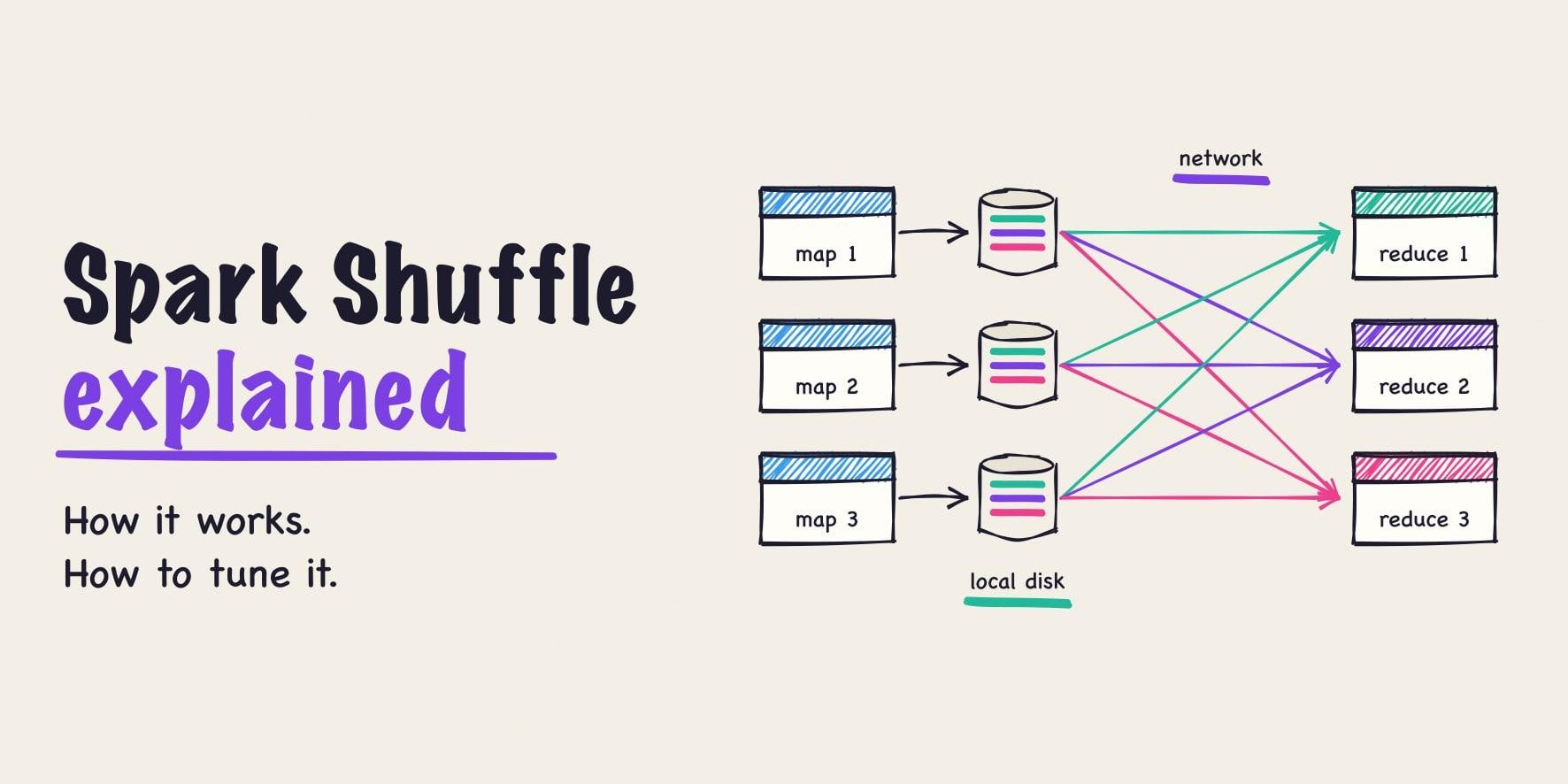
The overhead line restates the default so the number is visible. The partition count follows the tuning guide’s “2-3 tasks per CPU core” (level of parallelism): 145 cores × 2 to 3 is 290 to 435, and adaptive query execution merges small partitions at runtime. The Spark shuffle guide covers partition sizing in depth.
Fat vs. thin executors
Fat executors (one per node, 15 cores, a 100 GiB heap) maximize sharing, but large heaps lengthen garbage collection pauses. Cloudera’s post calls 64 GB “a rough guess at a good upper limit for a single executor,” and the Photon paper reports that “garbage collection performance was seriously impacted on heaps greater than 64GB.” Losing a fat executor also loses a node’s worth of tasks and shuffle output at once.
Thin executors (one core each) avoid long pauses but waste memory: every executor holds its own copy of each broadcast variable, every JVM pays at least 384 MiB of overhead, and no task can borrow execution memory from an idle neighbor.
Break the 5-core heuristic when the workload calls for it. Memory-hungry tasks, such as large aggregations, wide rows, or heavy UDF state, do better with fewer cores at the same heap. Many short, light tasks can take more.
YARN and Kubernetes specifics
YARN
YARN rejects containers larger than yarn.scheduler.maximum-allocation-mb, which defaults to 8,192 MiB, so a 40 GiB container needs that limit raised. The NodeManager also kills containers that exceed their physical memory, and Spark logs “Container killed by YARN for exceeding physical memory limits” with the hint “Consider boosting spark.executor.memoryOverhead.” AWS documents the same error for EMR in its knowledge center.
Kubernetes
Spark sets each executor pod’s memory request equal to its limit, using the same container formula. For the 36g, 5-core executor:
# Executor pod resources Spark generates for
# spark.executor.memory=36g and spark.executor.cores=5
resources:
  requests:
    cpu: "5"
    memory: 40550Mi
  limits:
    memory: 40550Mi
Pods are scheduled against allocatable memory, not capacity. Kubernetes subtracts kube-reserved, system-reserved, and the eviction threshold; in the Kubernetes docs example, a 32 GiB node leaves 28.5 GiB allocatable. DaemonSets take more, so size executors from kubectl describe node.
A container over its limit is killed by the kernel: the pod shows OOMKilled with exit code 137, which is 128 plus signal 9 (SIGKILL) under the shell convention. A heap OutOfMemoryError is different: Spark reports it as exit code 52 (SparkExitCode). Spark 4.2.0 adds spark.kubernetes.allocation.recoveryMode.enabled, which replaces OOM-terminated executors with recovery-mode executors that run one task per JVM. The Spark on Kubernetes guide covers the rest of the setup.
Diagnosing memory problems
Here is a deliberately undersized job, run on Spark 4.2.0 in local-cluster mode on a laptop: two executors with spark.executor.memory=1g and 2 cores each, caching 30 million rows as JVM objects, then grouping them by key into 4 partitions.
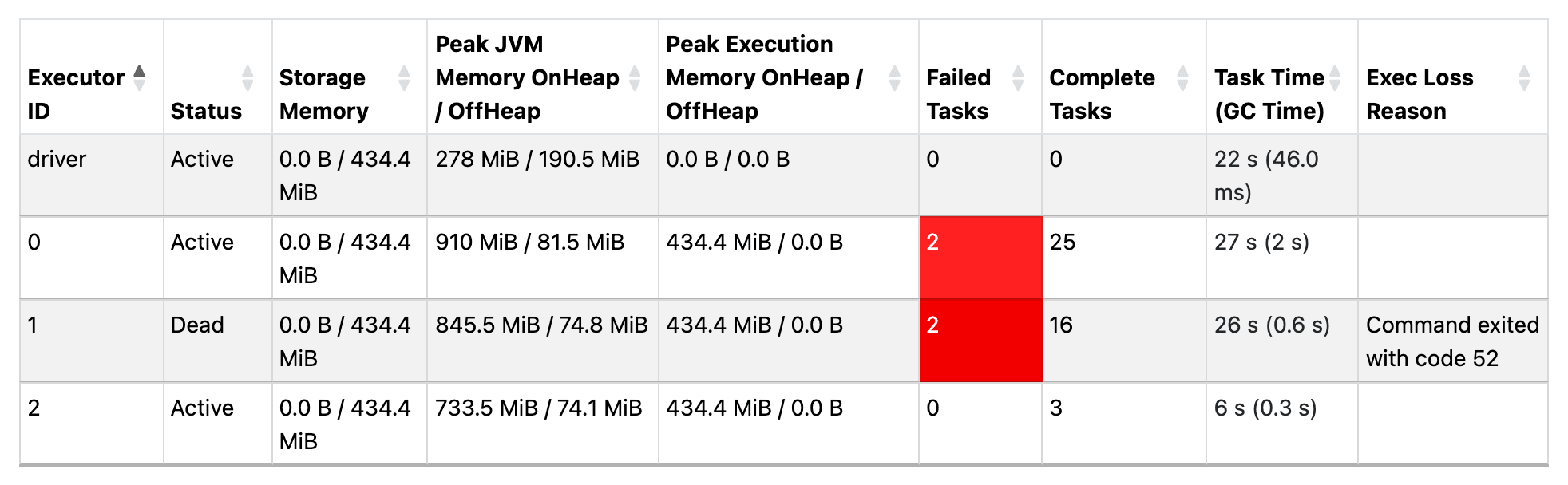
Executor 1 died with “Command exited with code 52”, an OutOfMemoryError. Peak Execution Memory shows 434.4 MiB on every executor, the entire unified pool for a 1 GiB heap.
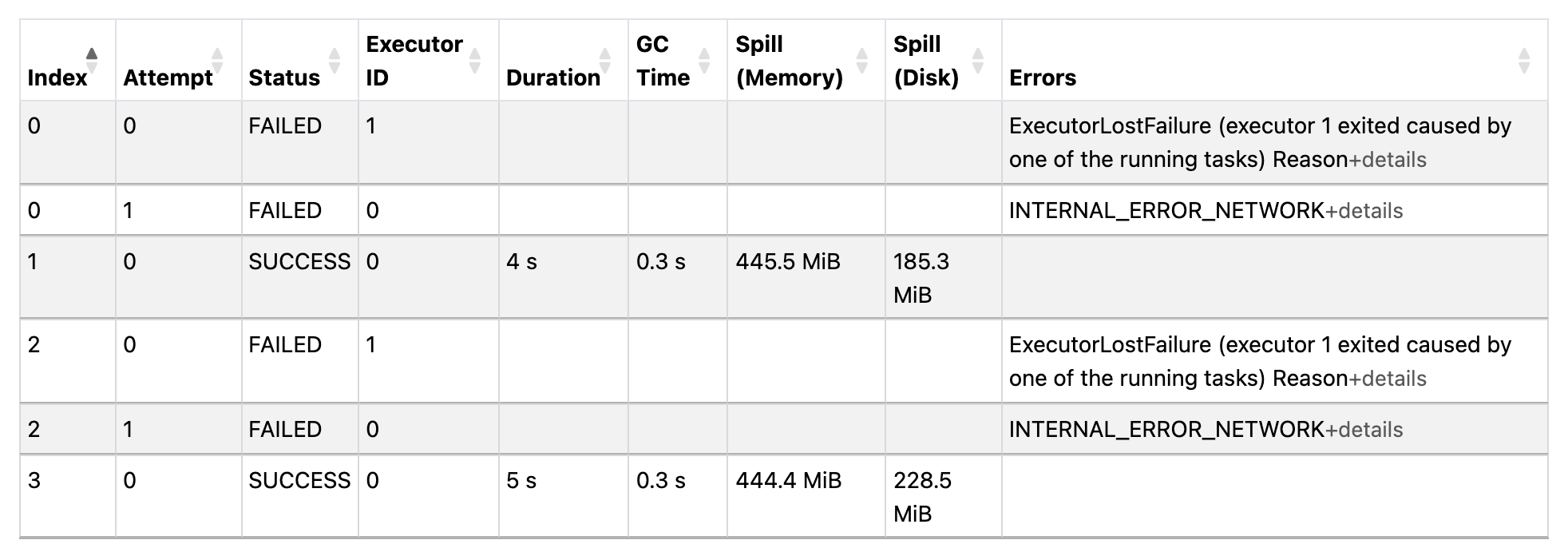
The surviving tasks each spilled about 445 MiB from memory (185 to 229 MiB on disk). The tasks on executor 1 failed with ExecutorLostFailure, and their retries hit fetch failures because the dead executor’s shuffle files were gone, so Spark reran the upstream stage. The job took 21.6 seconds. With the same 1 GiB executors and 64 partitions, it took 9.1 seconds with no failures and no spill:
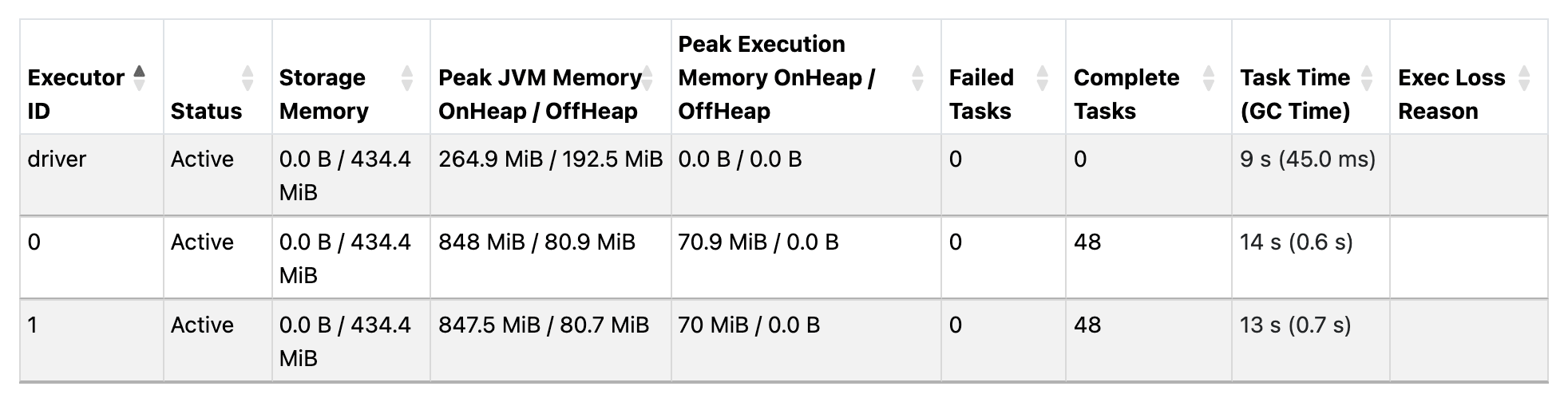
The fix was more partitions, not a bigger heap. Peak JVM heap barely moved (848 MiB against 910), because a busy heap holds garbage until the collector runs. Peak execution memory and failed tasks were the signals.
| Symptom | Where you see it | Likely cause | First fix |
|---|---|---|---|
OutOfMemoryError, exit code 52 |
Executors tab: Exec Loss Reason | Too much data per task: large or skewed partitions, groupByKey, big UDF state |
More partitions, fix skew, fewer cores per executor; raise the heap last |
YARN container kill, or OOMKilled with exit code 137 |
NodeManager log or pod events | Memory outside the heap: native libraries, Python workers, off-heap engines | Raise spark.executor.memoryOverhead or set spark.executor.pyspark.memory |
| Heavy spill | Stage page: Spill (Memory), Spill (Disk) | Task data larger than its execution share | More partitions, fewer cores per executor, less caching |
| GC time over 10% of task time | Executors tab: Task Time (GC Time) turns red | Heap full of live objects: deserialized cache, user memory | Cache less, cache DataFrames instead of object RDDs, smaller heaps |
| Driver OOM | Driver log | collect(), toPandas(), large broadcasts |
See the driver section below |
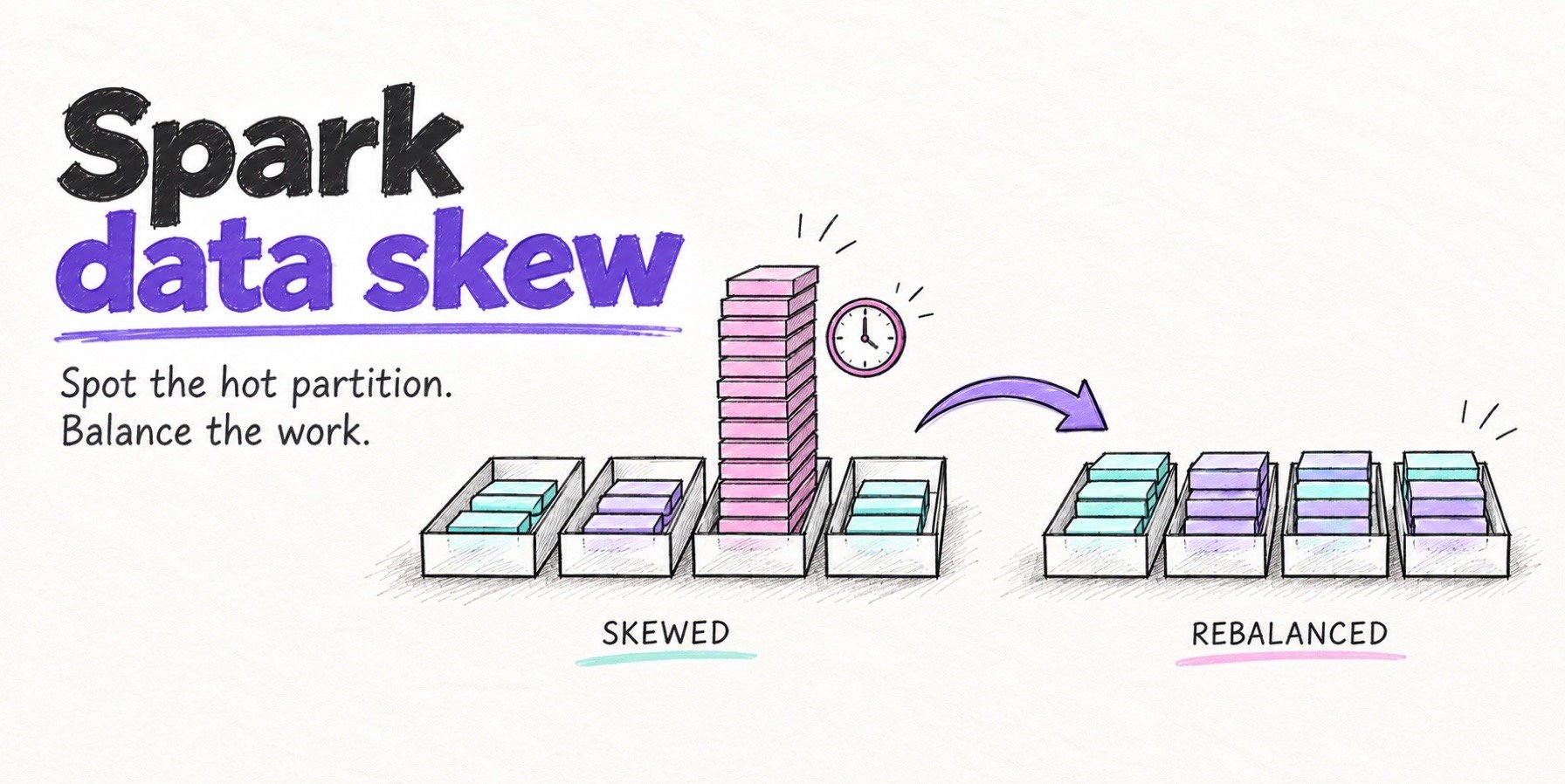
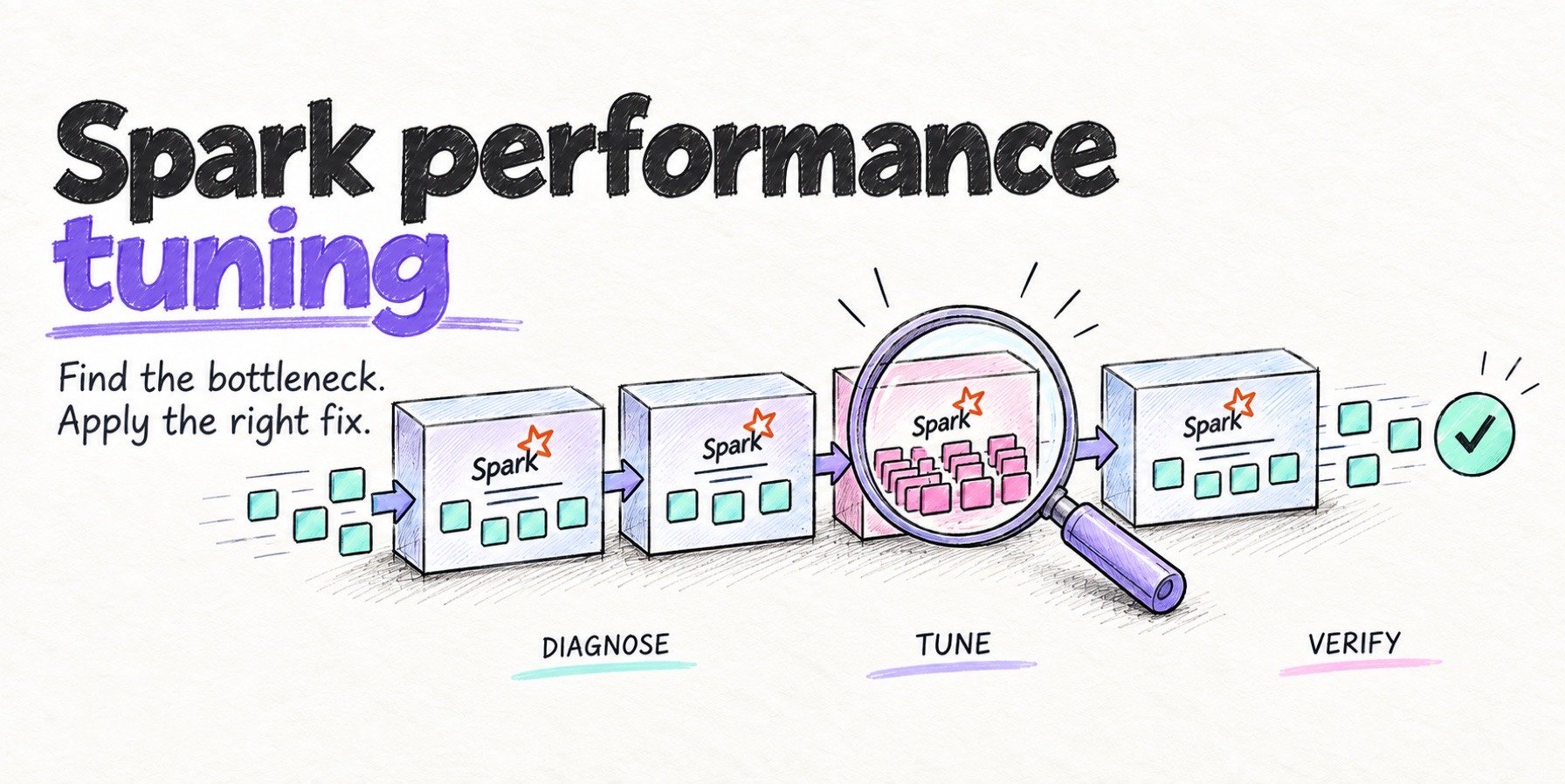
For spill and GC in the wider context of slow jobs, see Spark performance tuning; for skew, see Spark data skew.
Right-sizing from metrics
Size executors from what a job uses, in both directions: too small fails or spills, and too large wastes compute instance hours on memory nobody touches.
In the Executors tab, open Show Additional Metrics and turn on Peak JVM Memory and Peak Execution Memory. Task Time (GC Time) turns red when GC exceeds 10% of task time, a threshold set in the UI code. For finished applications, set spark.eventLog.logStageExecutorMetrics=true so the History Server keeps the peaks. To track runs over time, Spark 4.x serves executor metrics, including peakMemoryMetrics.JVMHeapMemory and totalGCTime, in Prometheus format at /metrics/executors/prometheus (monitoring docs). Luca Canali’s notes on Spark memory configuration go deeper on the same settings.
Then size unified memory to the largest observed peak of execution plus storage, with headroom you can defend. If peaks sit well below the pool and GC stays low, shrink the heap or pack more executors per node. If containers get killed while heap peaks look normal, raise overhead, not the heap. The Databricks cost optimization guide applies the same approach to cluster cost.
Driver memory, briefly
The driver has its own heap, spark.driver.memory (default 1g); in client mode, set it with --driver-memory, because the driver JVM has already started when your code runs. spark.driver.maxResultSize (default 1g) caps the “total size of serialized results of all partitions for each Spark action (e.g. collect),” and Spark aborts the job above it. Three things fill the driver heap: collect() and toPandas() on large results, and broadcast joins, because the driver collects the small side before broadcasting it. Raising spark.sql.autoBroadcastJoinThreshold (default 10 MB) raises driver memory needs too.
Off-heap memory and native engines
Native execution engines move working memory off the JVM heap, which shifts sizing toward spark.memory.offHeap.size and overhead.
- Photon: the Photon paper says “with Photon, most of the memory usage is off-heap, so garbage collection seldom occurs.”
- Apache DataFusion™ Comet: the Comet memory tuning guide says “Comet shares an off-heap memory pool with Spark,” sized by
spark.memory.offHeap.size. It also documents, candidly, how native allocations beyond the pool can still end in “ExecutorLostFailure with exit code 137” on Kubernetes, and the pool and overhead settings that address it. - Apache Gluten™: the getting-started guide states that “off-heap memory must be enabled,” and the project offers experimental dynamic off-heap sizing.
The pattern is the same: a smaller heap, a larger off-heap pool, more overhead for native allocations, and a container limit the engine’s memory accounting has to respect. When native memory escapes that accounting, the result is exit code 137, not a Java exception.
Quanton, the Spark engine from Onehouse, available on its own at quanton.dev, is built around storage-aware planning and optimizing the read, compute, and write of a pipeline together. It tracks native allocations against one executor budget under the container limit and uses an allocator designed to reduce fragmentation and retained memory; the post on why native Spark accelerators get OOMKilled explains the failure modes behind that design. Quanton is a separate engine that runs without the Onehouse platform, and its AI agent for Spark, free on every plan, diagnoses out-of-memory failures, spill, and GC pressure inside the Spark UI.
An executor memory checklist
- Treat
spark.executor.memoryas the heap only, and write down the full container request. - Know your unified pool: 0.6 × (heap − 300 MiB), the Storage Memory figure in the Executors tab.
- Divide execution memory by cores per executor before adding cores.
- Fit containers under
yarn.scheduler.maximum-allocation-mbor the node’s allocatable memory. - For exit code 52, fix partitions, skew, and cores first. For exit code 137 or a YARN kill, raise overhead.
- Turn on peak memory metrics and size from observed peaks.
Frequently asked questions
What does spark.executor.memory control?
The maximum JVM heap of each executor, 1g by default. It excludes memory overhead (by default the larger of 10% of the heap and 384 MiB), off-heap memory, and PySpark memory, which the cluster manager adds to the container request.
How much memory does each Spark task get?
Between 1/2N and 1/N of the executor’s execution memory, where N is the number of tasks running in that executor, which equals its cores when spark.task.cpus is 1.
Why is my executor OOMKilled when the heap looks fine?
Exit code 137 means the kernel killed the container for exceeding its memory limit. The heap cannot grow past spark.executor.memory, so something outside it grew: native libraries, Python workers, or off-heap engines. Raise spark.executor.memoryOverhead, or set spark.executor.pyspark.memory for PySpark jobs.
Is spark.yarn.executor.memoryOverhead still valid?
Spark 4.2.0 still accepts it, but it has been a deprecated alias of spark.executor.memoryOverhead since Spark 2.3. Use the new name.
Try Quanton on your own Spark jobs at quanton.dev. It runs as a separate engine without the Onehouse platform, or you can create an Onehouse account to run it managed.