Talk with our engineers by joining the new Onehouse community Slack!

TL;DR
- Offload Snowflake ETL to real Apache Spark with Quanton for cutting-edge performance and up to 65% compute savings on virtual warehouse compute. Avoid expensive Databricks or tolerating AWS EMR; Simply read Iceberg tables via Snowflake Catalog in Snowflake containers, transform with Quanton, and write back for fast Snowflake SQL querying.
The Full Story
Snowflake and Databricks have fought a holy war over table formats, causing market confusion and even huge disservices to open-source communities. For years, Snowflake had sustained efforts to advocate a certain open format, not others- a format they neither created nor contributed much to.
But, nearly 18 months after the dust has settled, Snowflake tables still default to its closed proprietary file formats and Databricks is defaulting to Delta Lake (after spending $1B to make Iceberg look like Delta Lake in slow motion). We have witnessed first hand hundreds of Databricks sales conversations start with Apache Iceberg, but end with Delta Lake.
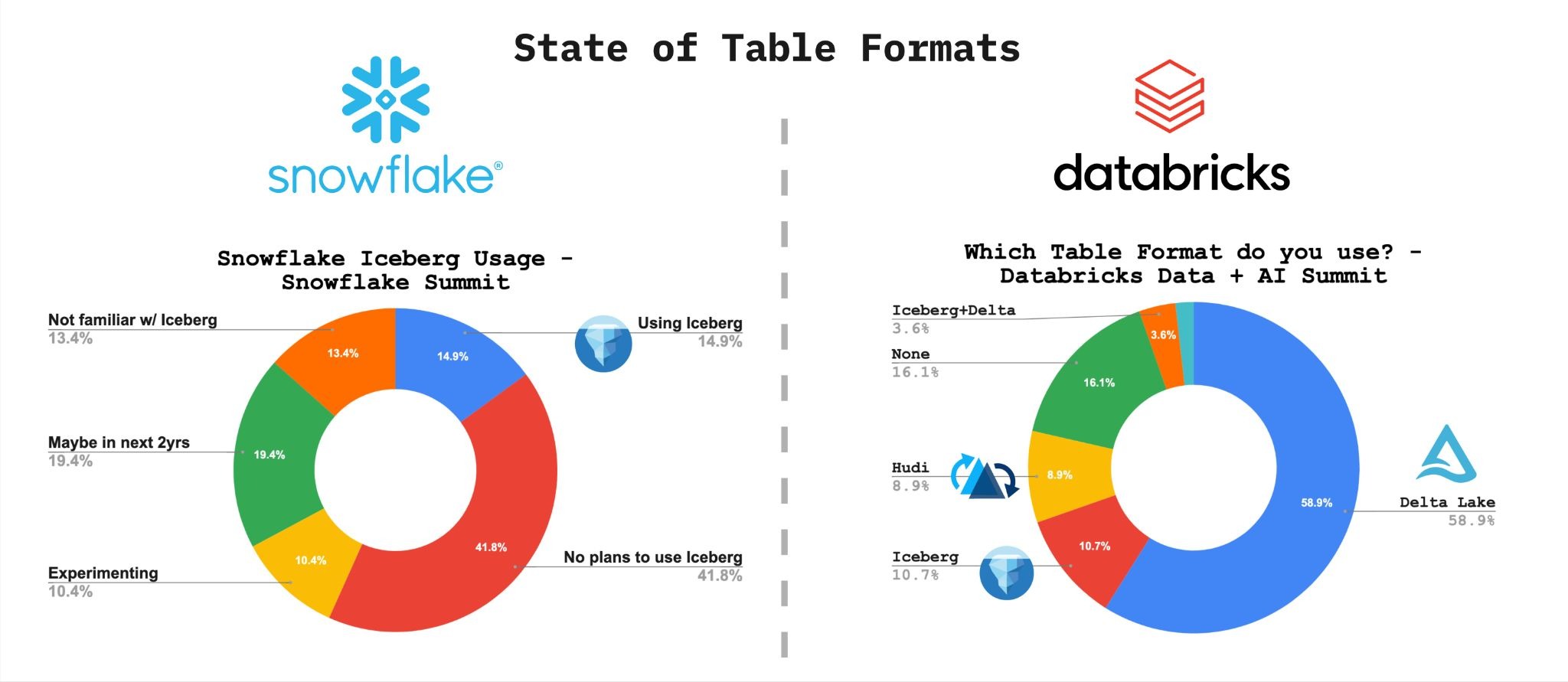
Our team spent two weeks at Snowflake Summit and Databricks Data+AI Summit last year, talking with more than 1,200 data engineers, architects, analytics leads, and founders. Only 15% of attendees reported actively using Iceberg. Nearly the same proportion had never heard of it. 41.8% had no plans to use it. At Databricks Data+AI Summit, Delta Lake owned 58.9% of the room. Iceberg sat at 10.7%, Hudi at 8.9%.
So, all of a sudden - everyone being on and only on Apache Iceberg, right now, right away - is not that important?
The Real Gap: Open Compute APIs and Spark
What if I told you the reason is the open format was never the actual battleground. The compute API and framework was the real friction point. Most companies that build a data lakehouse pair an open table format (Apache Iceberg, Apache Hudi, Delta Lake) with an open compute API/engine (Apache Spark, Apache Flink). The format war seemingly ended with Databricks paying $1B to acquire and consolidate control of both layers under a single vendor.
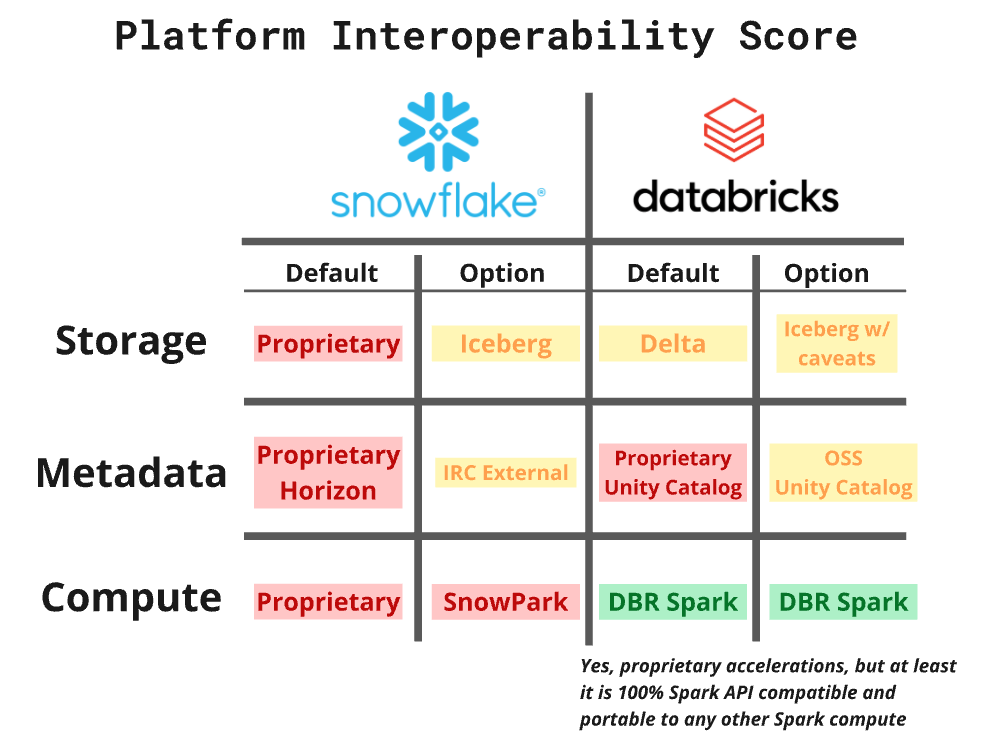
Apache Spark is to data compute what Iceberg is now pushed to be for table formats: the open standard. Spark has a rich ecosystem, first-class support across Hudi, Iceberg, and Delta, and a decade of production battle-testing behind it. A platform that genuinely supported open data infrastructure would give you real Spark. Snowflake’s answer to this has unfortunately been Snowpark.
And that’s the catch: Snowflake can’t run real Spark. Snowpark isn’t Spark, it’s a proprietary lookalike, so the lakehouse you build “inside” Snowflake is a lakehouse with no open engine or portability, which is why every serious Spark workload still has to run somewhere else: Databricks, EMR, anywhere but Snowflake.
Snowpark is not Spark
Snowpark was positioned as Spark on Snowflake. It has a Spark Connect-compatible API surface, which is enough to cover the basics. But if you have tried moving actual production workloads onto it, you have discovered the limits quickly.
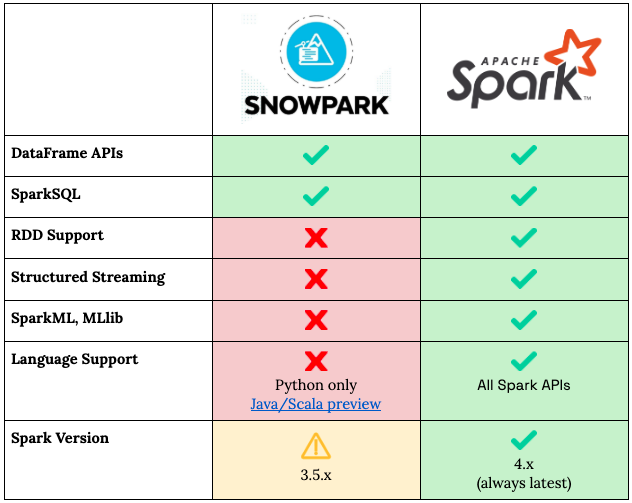
The PySpark syntax is supported. DataFrames work. But, when it comes to RDD apis, Spark Streaming, MLLib and other real Spark features, it draws a blank. What is also missing is the execution model that makes Spark indispensable at scale. Snowpark runs on Snowflake’s own query engine with a Spark dialect layered on top, which means it is subject to the constraints of that engine rather than Spark’s. There are no lower-level RDDs, UDF execution is constrained, and the optimizer controls that experienced Spark engineers rely on are largely absent. More problematically, Snowpark’s behavior diverges from real Spark in ways that compound in complex pipelines — skewed joins that Spark’s AQE would adapt around, broadcast thresholds that don’t apply, shuffle behavior that differs in ways that are difficult to predict without deep familiarity with where the two engines diverge.
For teams with significant investment in Spark, existing job code, custom libraries, ecosystem integrations, Snowpark is not a path forward.
The choice nobody should have to make
Given Snowpark’s limits, the conventional wisdom has pointed Snowflake teams toward a difficult decision: accept the Snowpark ceiling or migrate to Databricks… shudder…
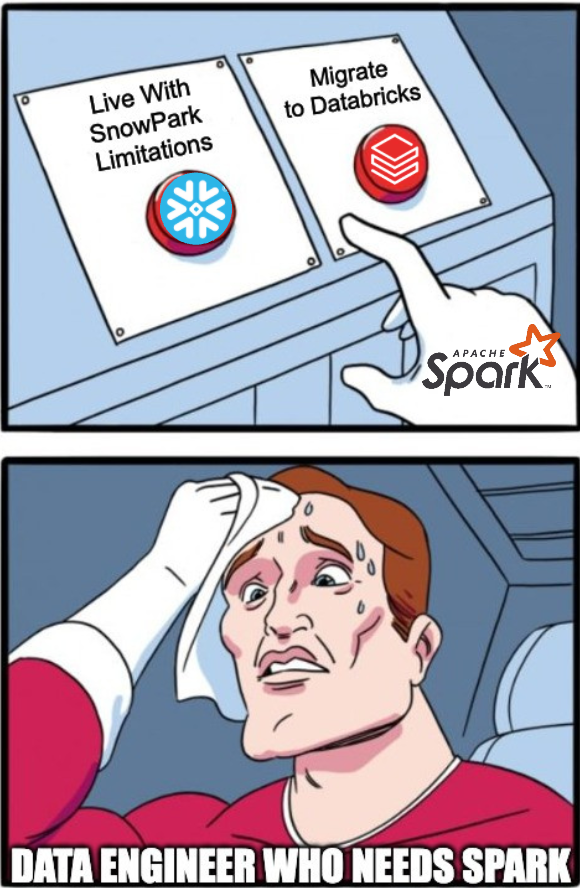
A migration to Databricks means more than switching a compute platform. It means renegotiating contracts, retraining engineering teams, and rebuilding data pipelines that already work. It means taking on a separate per-compute-credit billing relationship with a new vendor on top of your existing Snowflake investment. And it means leaving behind the governance model your organization has built on Snowflake, the data access controls, network policies, audit logs, and SSO integrations that your security and compliance teams depend on. None of that travels to a new platform automatically.
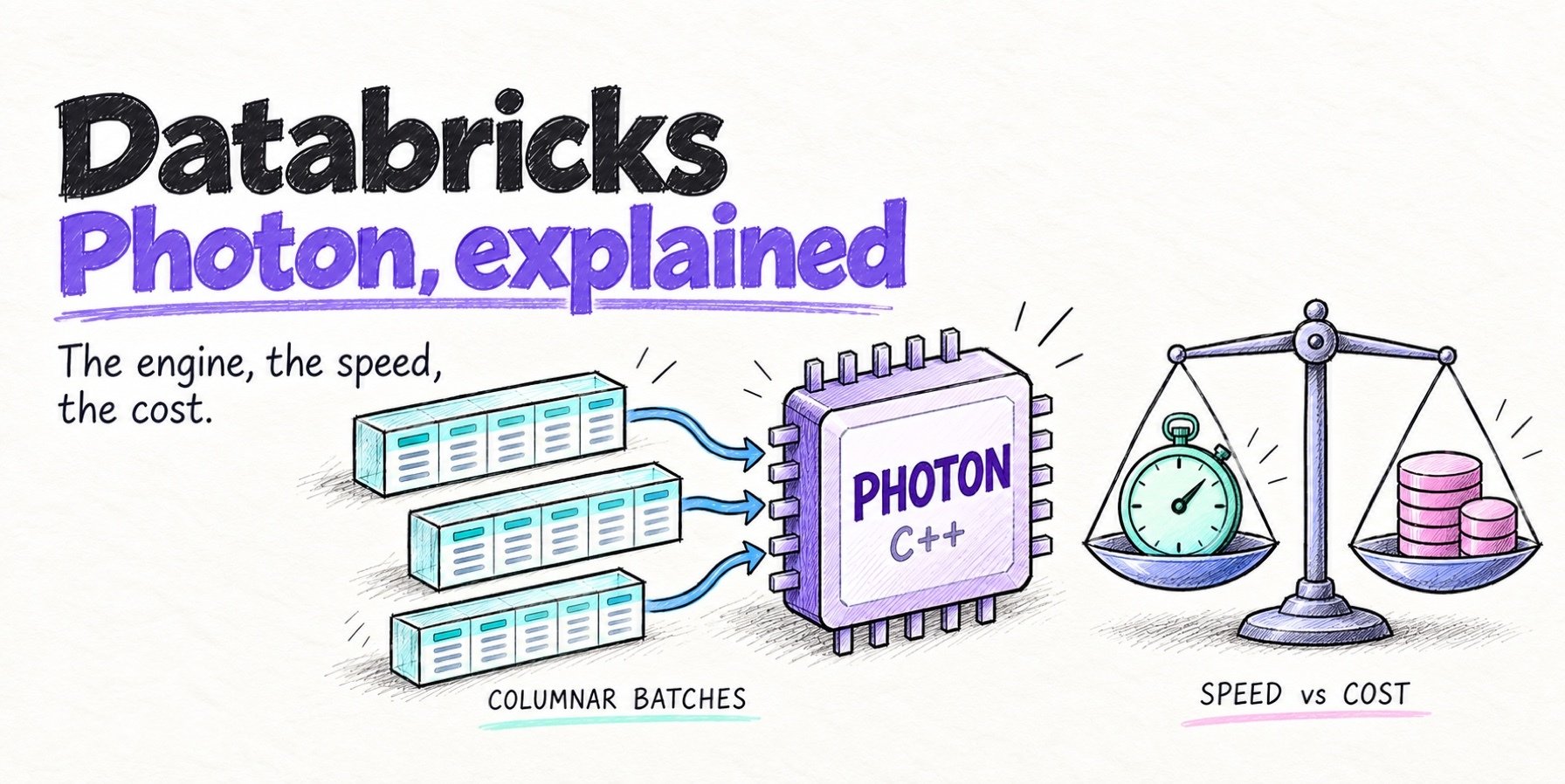
What if there was another way though? What if you could somehow extract the speed of a Databricks premium Photon engine and plug it into a native Spark experience inside Snowflake without migration?

Today: Quanton on Snowpark Container Services
Today we are excited to announce Quanton on Snowpark Container Services. This is real Apache Spark, not a compatible subset, running directly inside your Snowflake account, accelerated by native vectorized execution, with an embedded AI agent included.
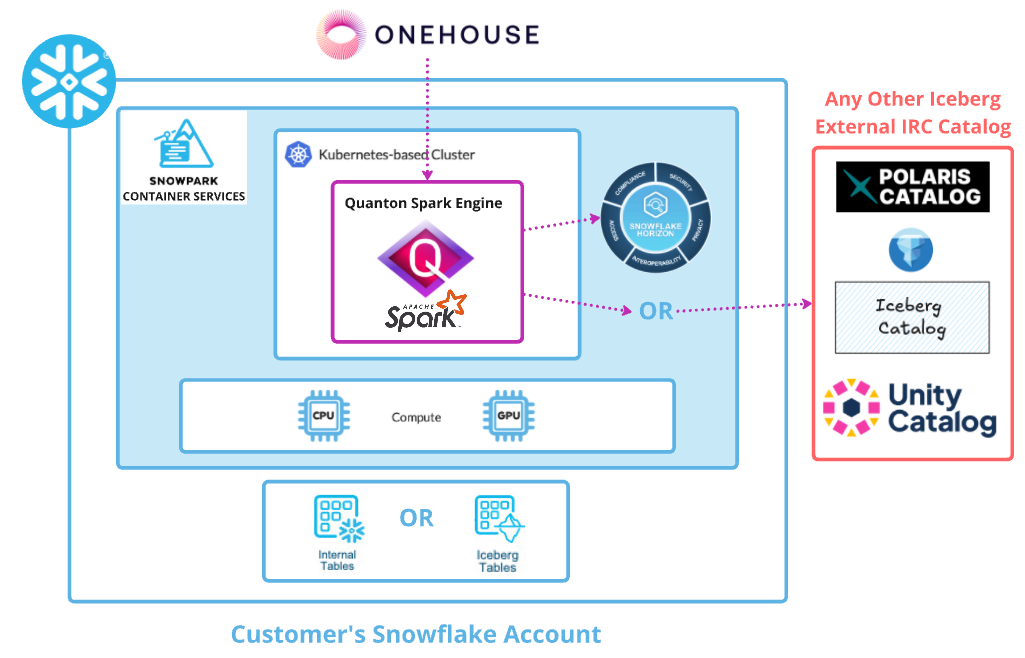
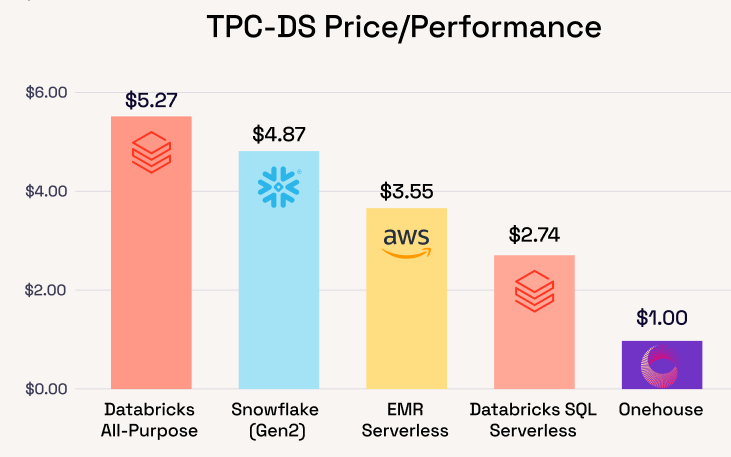
The quanton engine alone on a 1TB TPC-DS Apache Iceberg benchmark, delivers 2-5x improved price/performance compared to Databricks with Photon or even Snowflake itself.
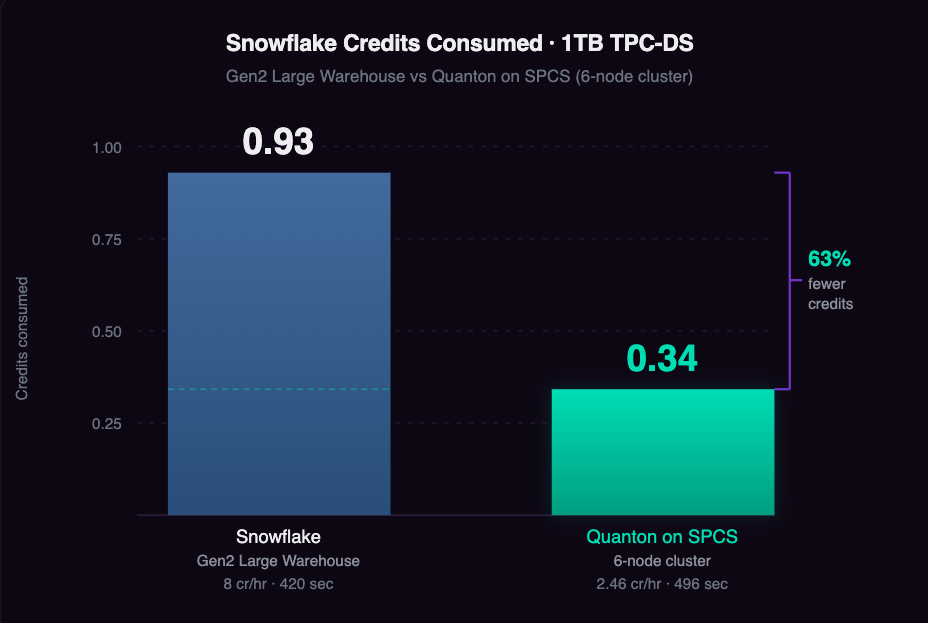
Since Quanton now runs directly in Snowpark Container services it will burn Snowflake Credits instead of driving bills on EC2 directly. Since Quanton significantly reduces the duration of the workload it also results in consuming less Snowflake Credits overall. In our analysis, 1TB TPC-DS burns 63% fewer Snowflake credits compared to a Gen2 Large Warehouse running the same workload. Your job code does not change. There is no migration, no second cloud bill, and no new vendor relationship to manage.
If Snowflake’s low Iceberg adoption is partly explained by the absence of a fast and affordable Spark engine to run it on Snowflake, perhaps Quanton can change this equation directly.
What Quanton actually is
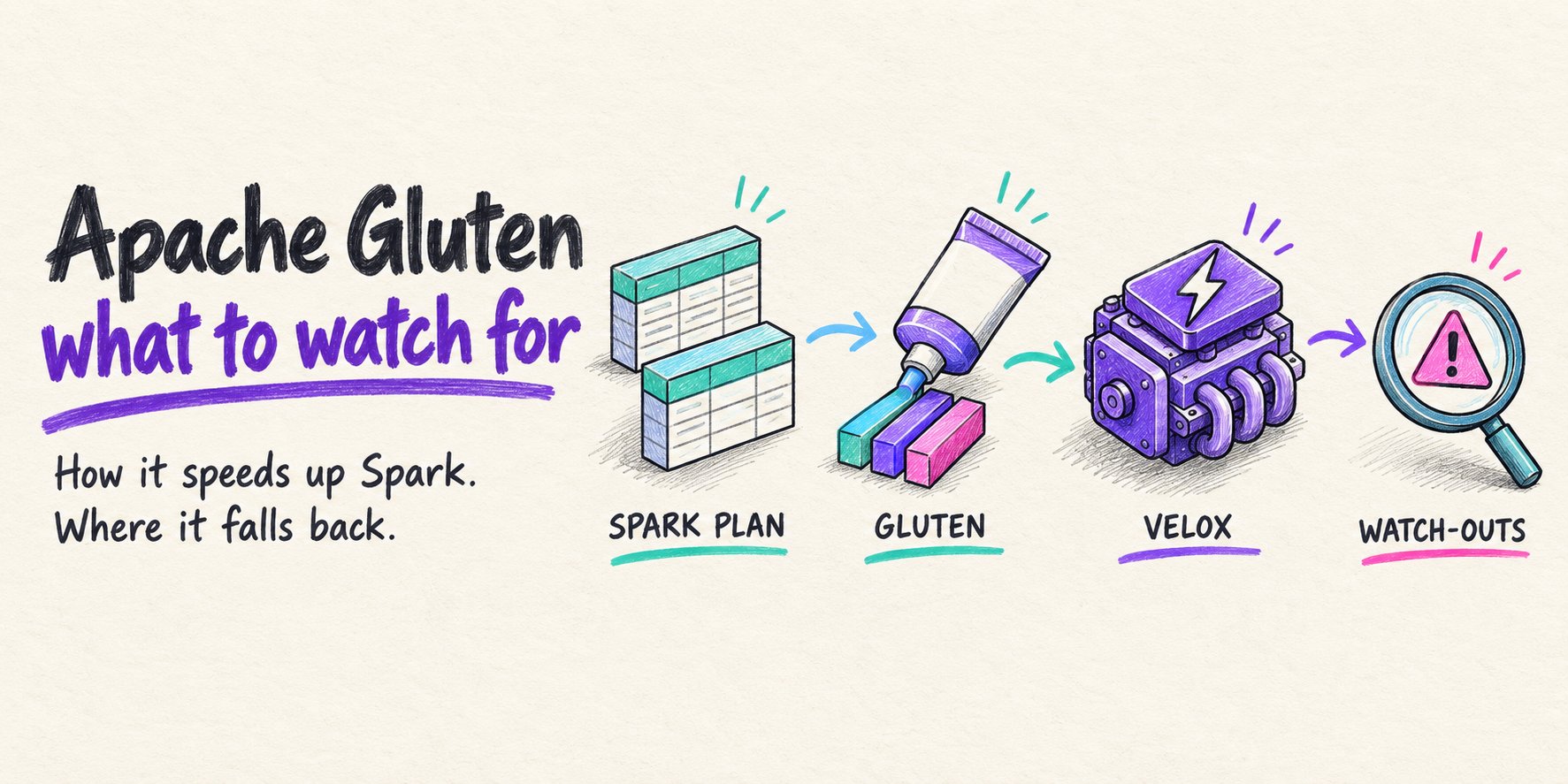
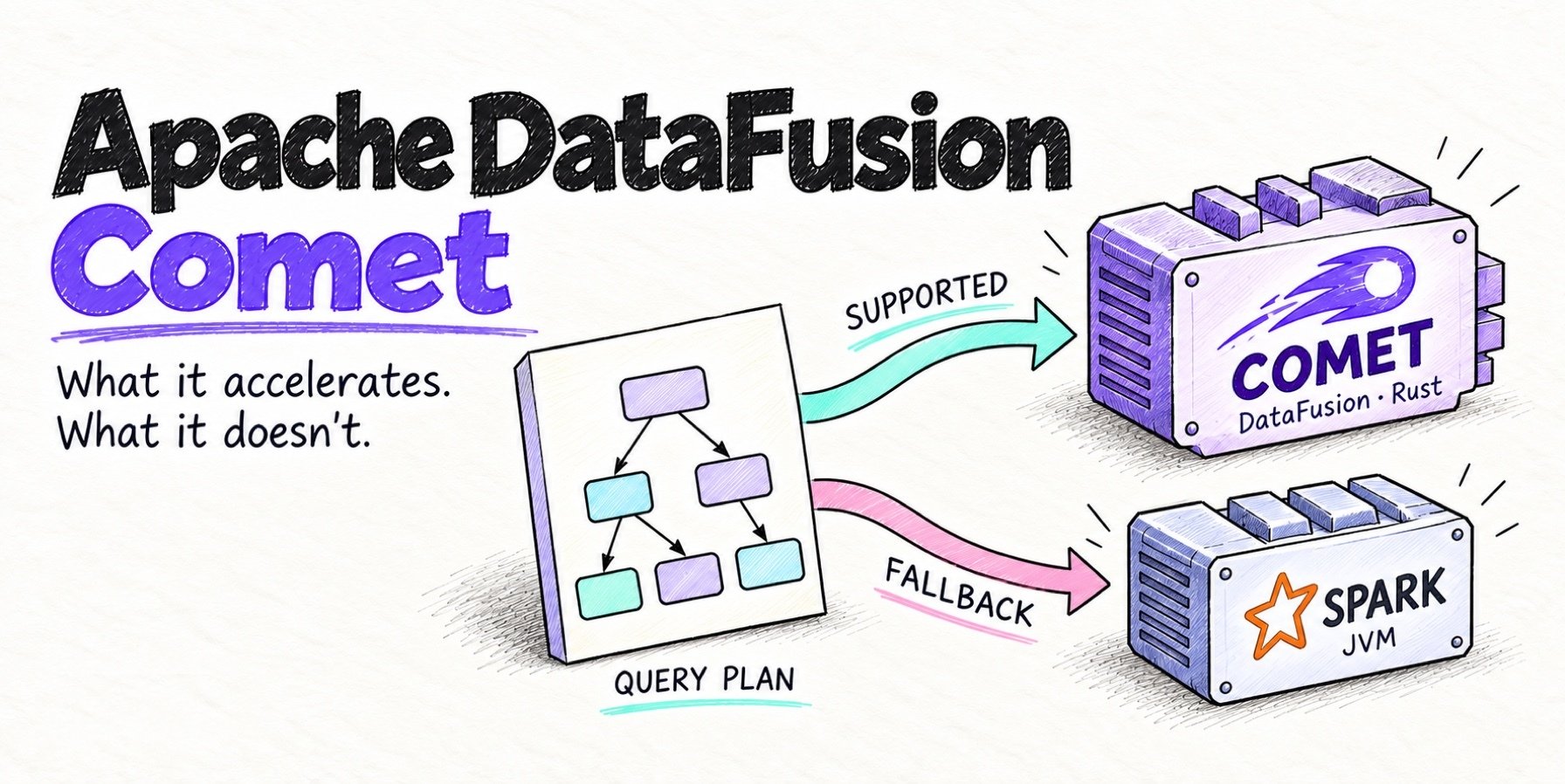
Quanton is a drop-in execution engine for Apache Spark — and the key word is engine, because it speeds up your whole job, not just one part of it. It runs your existing work unchanged: the same DataFrame API, the same SQL, the same spark-submit, the same support for Iceberg, Hudi, and Delta. The difference is what happens under the hood. Most accelerators you’ve heard of — like Apache Gluten or Apache Datafusion Comet — make the operators in the middle of a job (the filters, joins, and aggregations) run faster. That’s helpful, but it’s only one stage. A real pipeline also spends a lot of time reading data in and writing results back out, and that work is left untouched.
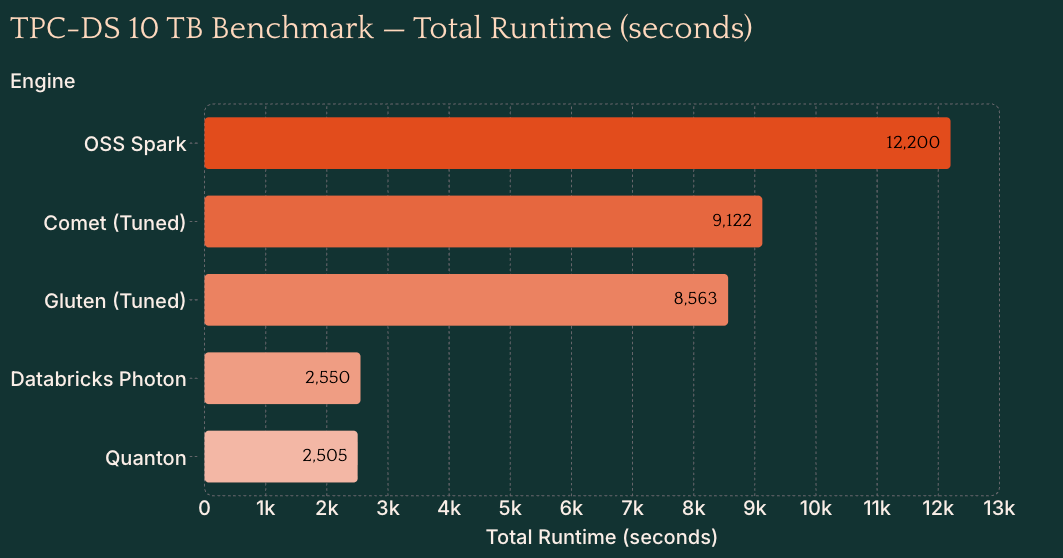
Quanton speeds up all three stages, reading, processing, and writing end to end. It’s faster than plain open-source Spark, and faster than operator-only accelerators like Gluten, because it understands your tables instead of treating them as a plain stream of rows: it reads smarter, plans less wasteful work, and writes only what actually changed. The payoff is simpler than the engineering behind it. You keep your existing code and your existing workflow, and the entire job just runs faster.
Why SPCS is the right deployment model
Snowpark Container Services is Snowflake’s bring-your-own-image runtime: you supply a container image, Snowflake runs it on compute pools inside your account, and the result is billed as Snowflake credits. Quanton fits into this model directly. Your Spark jobs run on SPCS compute, your entitlement is stored as a Snowflake secret encrypted at rest, and job submission happens from a Snowsight SQL worksheet. The experience for operators stays almost entirely inside the Snowflake UI.
Your data does not leave your Snowflake account. Your existing network policies, private link configurations, audit logging, and access control policies apply to SPCS workloads exactly as they do to warehouse workloads. For teams where Snowflake was chosen in part because of its security and compliance posture, SPCS means Spark workloads inherit that posture rather than requiring a new security review and a new perimeter to manage.
The billing model also becomes streamlined. Because SPCS compute is Snowflake-billed, running Quanton on SPCS does not require a separate cloud compute contract or a new vendor relationship. Your Spark workloads land in the same credits bucket as the rest of your Snowflake usage.
An AI agent for every Spark job
Every Quanton job ships with an embedded AI agent that functions as a dedicated Spark SRE watching the job in real time. It continuously ingests logs, stage DAGs, executor metrics, task timelines, shuffle statistics, and JVM/GC pressure into a single live view of what the job is doing.
When a job degrades or fails, the agent identifies the specific mechanism rather than surfacing generic error messages. It distinguishes between an OOM caused by insufficient driver memory, an OOM caused by skewed join partitions, and an OOM caused by a broadcast hint applied to a table that has grown beyond the broadcast threshold and it recommends the appropriate remedy for each. The same specificity applies to skew, fetch failures, broadcast timeouts, and the full range of operational issues that consume engineering time in production Spark environments.
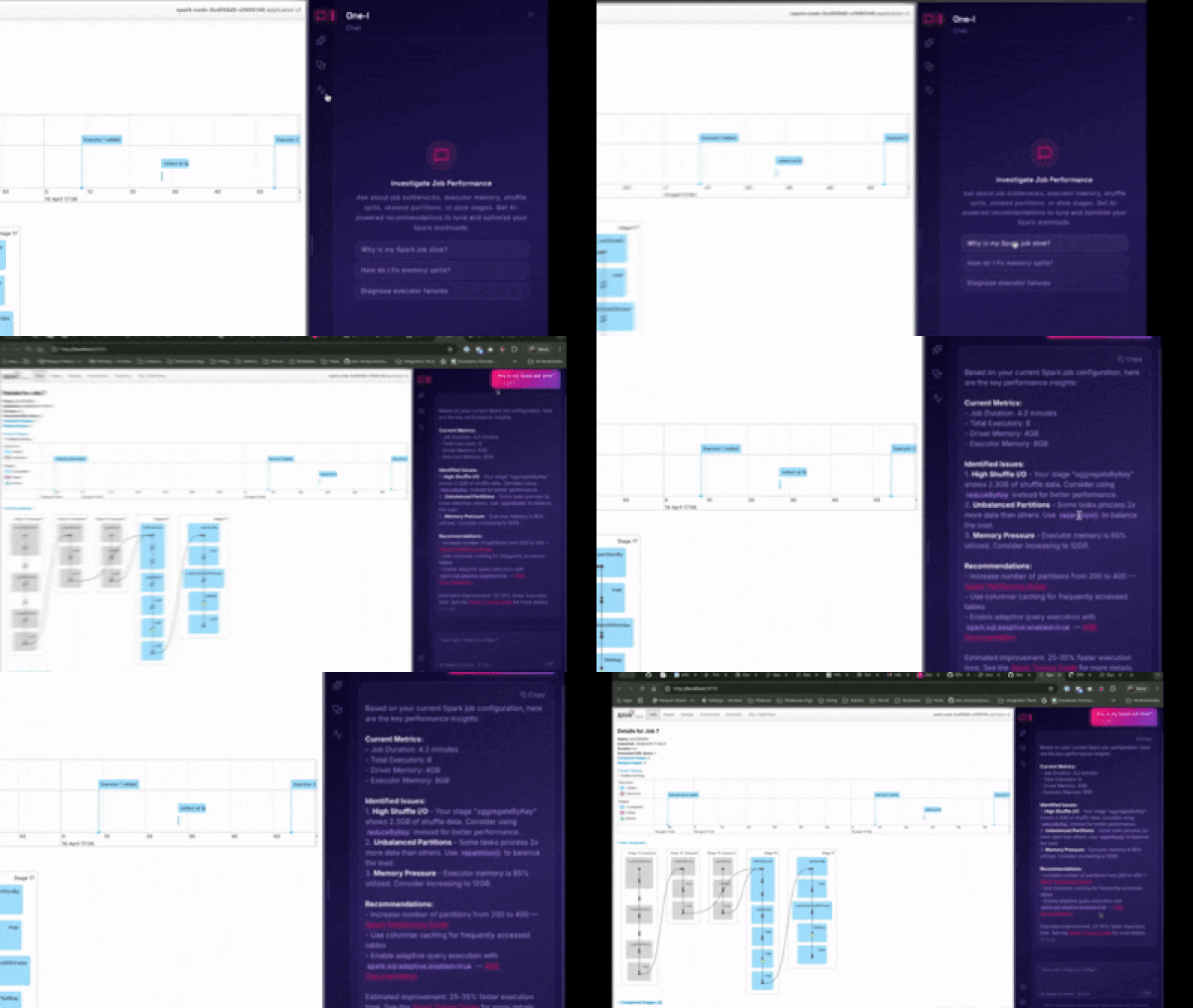
The agent lives inside the Spark UI and is backed by a knowledge server trained on a decade of Spark production experience, including lakehouse-specific patterns for Iceberg and Hudi workloads. You connect it with your own Claude or OpenAI API key, stored in your browser. Prompts and job data do not touch our servers.
How deployment works
The deployment model is designed around the constraint that most Snowflake operators work primarily in Snowsight, not the command line. Everything except a single, one-time step runs from SQL worksheets. And that one step is pushing the Quanton container image to your Snowflake image repository.
SPCS only runs images from your account’s own registry, and the push requires Docker. Once the image is in your registry, it never needs to be pushed again unless you want to update the version. After that, all job submission, monitoring, and lifecycle management happens in Snowsight.
The entitlement that enables Quanton execution comes from your onehouse-values.yaml, downloaded from the Onehouse console when you create a project. You store the entitlement blob once as a Snowflake secret, a single SQL statement, and Quanton reads it from there at startup, deriving its configuration automatically. You never paste credentials into a job spec.
A detailed step-by-step guide can be found in the Quanton documentation here: https://quanton.dev/docs/guides/snowflake/
Wrapping up: You can now stay on Snowflake. Beat Databricks Spark Performance.
The Snowflake user base slow adoption of Iceberg is not an indication that data engineers don’t want open formats. It’s an indication that the tooling hasn’t made the switch worth it. Snowpark isn’t a real Spark alternative. Migrating to Databricks to get real Spark is an expensive and disruptive bet. Running Spark yourself carries an operational burden most teams can’t absorb.
Quanton on SPCS is the path that doesn’t require any of those tradeoffs. Real Apache Spark, running inside the account you already have, at a price/performance that beats every alternative in the market without moving your data, your governance model, or your team.
Get started with your first 100 GB free: quanton.dev/docs/guides/snowflake
Join the Slack community: https://quanton.short.gy/onehouse-slack
Author

Kyle Weller
VP of Product
Experience includes Azure Databricks, Azure ML, Cortana AI Agent, global scale data and experimentation platforms for Bing Search, and Office 365. Onehouse author and speaker.