Talk with our engineers by joining the new Onehouse community Slack!
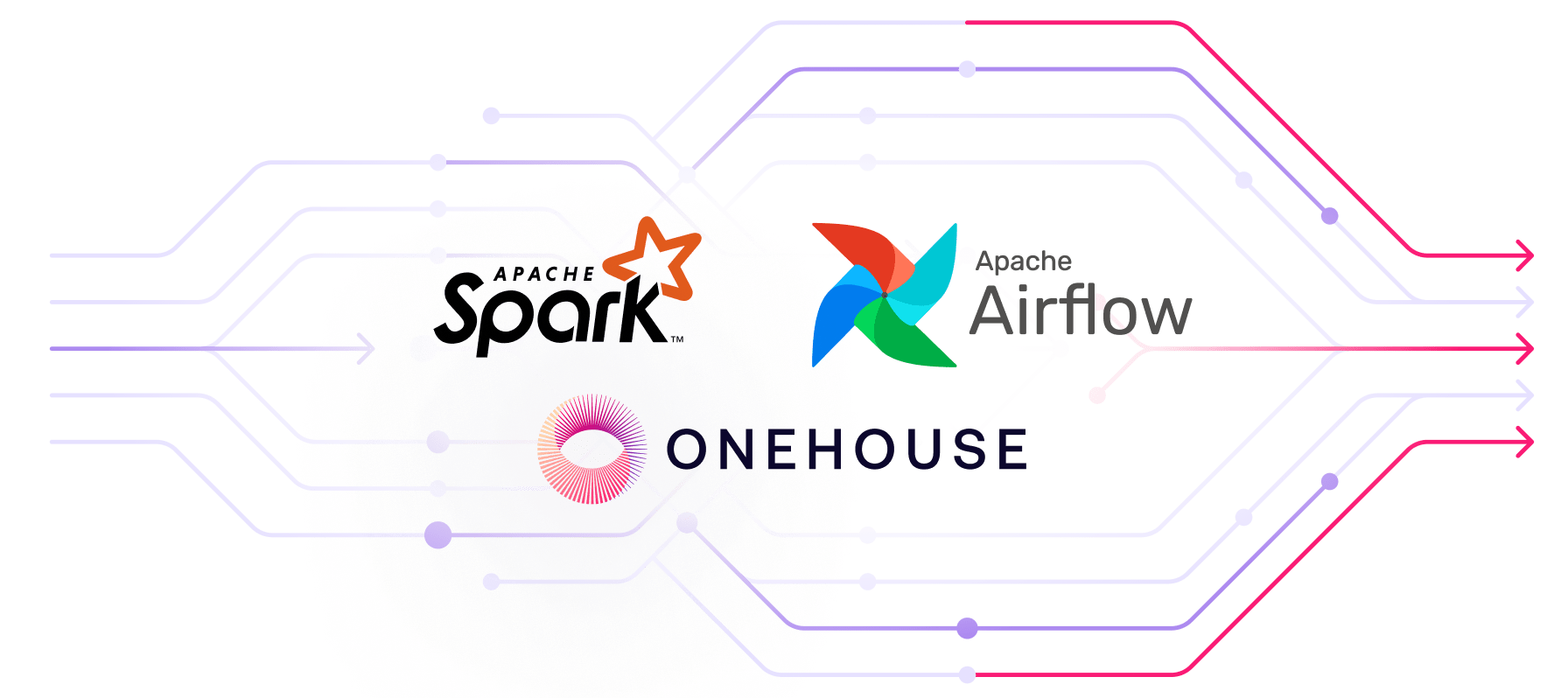
Running Apache Spark™ workloads efficiently requires careful orchestration of cluster lifecycle, job scheduling, and resource management. Apache Airflow™ is the most popular orchestration solution, enabling teams to build production-grade job scheduling with retries, timeouts, and observability.
With Onehouse’s native Apache Airflow integration, you can orchestrate production-grade data pipelines on the Quanton Engine for 3-4x higher price-performance on ETL workloads, without sacrificing the flexibility and control that Airflow provides.
In this post, we’ll cover how Airflow works with Spark and explore how to use the Onehouse Airflow provider to build production-ready ETL pipelines.
Production Spark Workloads: Why Orchestration Matters
Apache Spark may be used to run a wide variety of workloads, each with unique orchestration requirements. Below are some examples we frequently see:
ETL Pipelines: Nightly batch jobs that extract data from source systems, transform it through multiple stages, and load it into your data lakehouse. These pipelines often involve sequences of dependent Spark jobs - for example, first ingesting raw customer data, then enriching it with third-party information, and finally aggregating metrics for analytics. Orchestration ensures each stage completes successfully before the next begins.
Incremental Data Processing: Hourly or continuous jobs that process new data as it arrives. You might have a Spark Streaming job that reads from Apache Kafka™, applies transformations, and writes to Apache Hudi™ or Apache Iceberg™ tables. Orchestration helps you manage cluster lifecycle, monitor job health, and restart failed jobs automatically.
ML Feature Engineering: Complex pipelines that prepare training data for machine learning models. These often combine multiple data sources, apply feature transformations, and compute aggregations across large time windows. With orchestration, you can schedule these computationally expensive jobs during off-peak hours and chain them with model training workflows.
Data Quality Checks: Validation jobs that run after each data load to ensure completeness, accuracy, and consistency. Orchestration lets you conditionally trigger downstream processes only when quality checks pass, preventing bad data from propagating through your system.
The challenge with these workloads is coordination. How do you ensure clusters are provisioned when needed? How do you handle dependencies between jobs? What happens when a job fails midway through a multi-step process? This is where Airflow becomes essential - it provides the orchestration layer that turns individual Spark jobs into reliable, production-grade data pipelines.
What is Apache Airflow?
Apache Airflow is an open-source platform for programmatically authoring, scheduling, and monitoring workflows. At its core, Airflow represents workflows as Directed Acyclic Graphs (DAGs) - collections of tasks with defined dependencies. This makes it the de facto standard for orchestrating data pipelines in production.
Why Airflow matters for production Spark workloads:
Dependency Management: Airflow explicitly defines task dependencies, ensuring jobs run in the correct order. If your feature engineering job depends on data ingestion completing successfully, Airflow enforces this relationship automatically.
Scheduling and Automation: Schedule pipelines to run on cron expressions, trigger them based on external events, or backfill historical data. Your nightly ETL runs at 2 AM without manual intervention.
Monitoring and Alerting: Track job execution in real-time through the Airflow UI. Get alerted when pipelines fail, retry failed tasks automatically, and maintain SLAs for critical workloads.
Reusability and Modularity: Define common patterns once (like “create cluster → run job → cleanup”) and reuse them across multiple pipelines. This reduces code duplication and standardizes your data workflows.
Airflow’s key concepts include:
- DAGs: Step-by-step workflows that define task dependencies
- Operators: Templates for specific types of tasks (like running a Spark job)
- Sensors: Operators that wait for certain conditions before proceeding
- Hooks: Interfaces to external systems (like the Onehouse API)
For data teams moving Spark workloads to production, Airflow provides the capabilities needed to run at scale - handling failures gracefully and providing visibility into pipeline health.
The Onehouse-Airflow Integration
The apache-airflow-providers-onehouse package provides native operators and sensors that wrap the Onehouse SQL API, making it straightforward to manage clusters and jobs directly from your Airflow DAGs. Under the hood, the integration uses:
- OnehouseHook: Handles authentication and API communication with Onehouse
- Operators: Execute actions like creating clusters, defining jobs, and running workloads
- Sensors: Monitor asynchronous operations until completion
This design means you can orchestrate your entire Spark pipeline lifecycle - from cluster provisioning to job execution to cleanup - using familiar Airflow patterns.
Setting Up the Integration
First, install the Onehouse provider:
pip install apache-airflow-providers-onehouseNext, configure an Airflow connection to your Onehouse account. Navigate to Admin > Connections in the Airflow UI and create a new connection with these settings:
- Connection Id: onehouse_default
- Connection Type: Generic
- Host: https://api.onehouse.ai
- Extra:
{
"project_uid": "your-project-uid",
"user_id": "your-user-id",
"api_key": "your-api-key",
"api_secret": "your-api-secret",
"link_uid": "your-link-uid",
"region": "your-region"
}
You can find these credentials in your Onehouse account settings.
Building a Basic Spark Pipeline
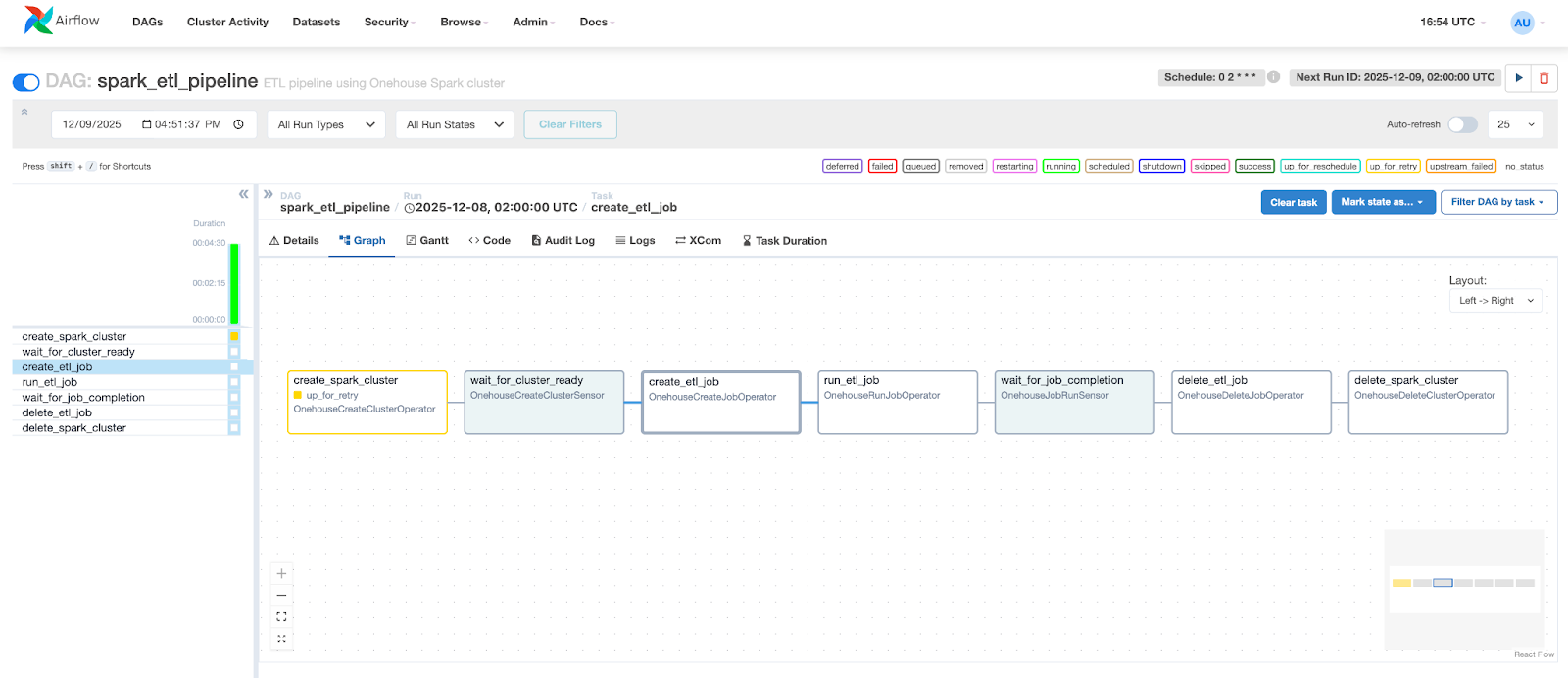
Let’s walk through a complete example that creates a cluster, runs a PySpark job, and cleans up resources afterward:
from datetime import datetime, timedelta
from airflow import DAG
from airflow_providers_onehouse.operators.clusters import (
    OnehouseCreateClusterOperator,
    OnehouseDeleteClusterOperator,
)
from airflow_providers_onehouse.operators.jobs import (
    OnehouseCreateJobOperator,
    OnehouseRunJobOperator,
    OnehouseDeleteJobOperator,
)
from airflow_providers_onehouse.sensors.onehouse import (
    OnehouseJobRunSensor,
    OnehouseCreateClusterSensor
)

default_args = {
    'owner': 'data-team',
    'depends_on_past': False,
    'retries': 1,
    'retry_delay': timedelta(minutes=5),
}

with DAG(
    dag_id="spark_etl_pipeline",
    default_args=default_args,
    description="ETL pipeline using Onehouse Spark cluster",
    schedule_interval='0 2 * * *',  # Run daily at 2 AM
    start_date=datetime(2025, 1, 1),
    catchup=False,
    tags=["spark", "etl", "onehouse"],
) as dag:

    # Step 1: Create a Spark cluster
    create_cluster = OnehouseCreateClusterOperator(
        task_id="create_spark_cluster",
        cluster_name="etl_cluster",
        cluster_type="Spark",
        max_ocu=2,
        min_ocu=1,
        conn_id="onehouse_default",
    )

    # Step 2: Wait for cluster to be ready
    wait_for_cluster = OnehouseCreateClusterSensor(
        task_id="wait_for_cluster_ready",
        cluster_name="{{ ti.xcom_pull(task_ids='create_spark_cluster') }}",
        conn_id="onehouse_default",
        poke_interval=30,
        timeout=1800,  # 30 minutes
    )

    # Step 3: Define the Spark job
    create_job = OnehouseCreateJobOperator(
        task_id="create_etl_job",
        job_name="customer_data_etl",
        job_type="PYTHON",
        parameters=[
            "--conf", "spark.archives=s3a://my-bucket/venvs/etl-env.tar.gz#environment",
            "--conf", "spark.pyspark.python=./environment/bin/python",
            "--conf", "spark.driver.memory=4g",
            "--conf", "spark.executor.memory=8g",
            "s3a://my-bucket/jobs/customer_etl.py",
        ],
        cluster_name="etl_cluster",
        conn_id="onehouse_default",
    )

    # Step 4: Execute the job
    run_job = OnehouseRunJobOperator(
        task_id="run_etl_job",
        job_name="customer_data_etl",
        conn_id="onehouse_default",
    )

    # Step 5: Monitor job completion
    wait_for_job = OnehouseJobRunSensor(
        task_id="wait_for_job_completion",
        job_name="customer_data_etl",
        job_run_id="{{ ti.xcom_pull(task_ids='run_etl_job') }}",
        conn_id="onehouse_default",
        poke_interval=60,
        timeout=3600,  # 1 hour
    )

    # Step 6: Cleanup - Delete job definition
    delete_job = OnehouseDeleteJobOperator(
        task_id="delete_etl_job",
        job_name="customer_data_etl",
        conn_id="onehouse_default",
    )

    # Step 7: Cleanup - Delete cluster
    delete_cluster = OnehouseDeleteClusterOperator(
        task_id="delete_spark_cluster",
        cluster_name="etl_cluster",
        conn_id="onehouse_default",
    )

    # Define task dependencies
    (
        create_cluster
        >> wait_for_cluster
        >> create_job
        >> run_job
        >> wait_for_job
        >> delete_job
        >> delete_cluster
    )
Breaking Down the Pipeline
This DAG demonstrates a complete cluster lifecycle:
- Cluster Creation: OnehouseCreateClusterOperator provisions a Spark cluster with specified OCU (Onehouse Compute Unit) limits
- Readiness Check: OnehouseCreateClusterSensor polls until the cluster is ready to accept jobs
- Job Definition: OnehouseCreateJobOperator creates a job definition, including Spark configurations and the path to your PySpark script
- Job Execution: OnehouseRunJobOperator triggers the job and returns a run ID
- Completion Monitoring: OnehouseJobRunSensor tracks the job’s progress
- Resource Cleanup: Both job definition and cluster are deleted after completion
Notice the use of XComs (Airflow’s cross-communication mechanism) to pass values between tasks - the cluster name and job run ID flow automatically through the pipeline.
Managing Long-Running Jobs
For long-running or potentially problematic jobs, you can incorporate cancellation logic:
from airflow_providers_onehouse.operators.jobs import OnehouseCancelJobRunOperator
from airflow.sensors.time_delta import TimeDeltaSensor

# Add a timeout sensor
job_timeout = TimeDeltaSensor(
    task_id="job_timeout_check",
    delta=timedelta(hours=2),
)

# Cancel job if timeout is reached
cancel_job = OnehouseCancelJobRunOperator(
    task_id="cancel_long_running_job",
    job_run_id="{{ ti.xcom_pull(task_ids='run_etl_job') }}",
    job_name="customer_data_etl",
    conn_id="onehouse_default",
    trigger_rule="one_failed",  # Only run if previous task fails
)
Advanced: Modifying Jobs Mid-Pipeline
Sometimes you need to adjust job configurations between runs. The OnehouseAlterJobOperator handles this. For comprehensive updates, chain multiple alter operations:
# Update the cluster assignment
change_cluster = OnehouseAlterJobOperator(
    task_id="reassign_to_larger_cluster",
    job_name="data_transform",
    cluster_name="high_memory_cluster",
)

# Then update the parameters
alter_params = OnehouseAlterJobOperator(
    task_id="increase_memory_allocation",
    job_name="data_transform",
    parameters=[
        "--conf", "spark.driver.memory=8g",
        "--conf", "spark.executor.memory=16g",
        "s3a://my-bucket/jobs/transform.py",
    ],
)

change_cluster >> alter_params >> run_job
Migrating from Amazon EMR Job Flows to Onehouse
If you’re currently using Amazon EMR Job Flows, Onehouse offers an easy migration path with 3x better price-performance.
EMR Job Flows let you spin up a cluster, run a series of steps (Spark jobs), then tear everything down - a pattern that works well for cost efficiency when running scheduled batch jobs. You can replicate this same orchestration pattern with the Onehouse Airflow operators, which map directly to EMR concepts:
| EMR Job Flow | Onehouse Equivalent |
|---|---|
| Create EMR Cluster | CREATE CLUSTER |
| Add Step | CREATE JOB |
| Step Execution | RUN JOB |
| Monitor Step | DESCRIBE JOB_RUN |
| Terminate Cluster | DELETE CLUSTER |
The DAG example above implements this exact flow on Onehouse infrastructure. You can extend it to run multiple jobs sequentially:
# Create multiple jobs on the same cluster
create_job_1 = OnehouseCreateJobOperator(
    task_id="create_ingestion_job",
    job_name="data_ingestion",
    job_type="PYTHON",
    parameters=["s3a://my-bucket/jobs/ingest.py"],
    cluster_name="etl_cluster",
)

create_job_2 = OnehouseCreateJobOperator(
    task_id="create_transform_job",
    job_name="data_transform",
    job_type="PYTHON",
    parameters=["s3a://my-bucket/jobs/transform.py"],
    cluster_name="etl_cluster",
)

# Run them sequentially
run_job_1 = OnehouseRunJobOperator(task_id="run_ingestion", job_name="data_ingestion")
wait_job_1 = OnehouseJobRunSensor(
    task_id="wait_ingestion",
    job_name="data_ingestion",
    job_run_id="{{ ti.xcom_pull(task_ids='run_ingestion') }}",
)

run_job_2 = OnehouseRunJobOperator(task_id="run_transform", job_name="data_transform")
wait_job_2 = OnehouseJobRunSensor(
    task_id="wait_transform",
    job_name="data_transform",
    job_run_id="{{ ti.xcom_pull(task_ids='run_transform') }}",
)

# Chain them together
create_cluster >> wait_for_cluster >> [create_job_1, create_job_2]
create_job_1 >> run_job_1 >> wait_job_1
create_job_2 >> run_job_2 >> wait_job_2
[wait_job_1, wait_job_2] >> delete_cluster
💡 Alternatively, if you prefer to simplify your orchestration, you can keep jobs on a persistent cluster in Onehouse. Since Onehouse clusters automatically scale down to zero nodes when no jobs are running, you get the same cost efficiency without the overhead of cluster lifecycle management.
Best Practices
Based on the integration design, here are some recommendations:
1. Use Sensors for Async Operations
Always use OnehouseCreateClusterSensor and OnehouseJobRunSensor rather than arbitrary sleep periods. This ensures your DAG proceeds as soon as resources are ready, reducing total runtime.
2. Set Appropriate Timeouts
Configure realistic timeout values on sensors based on your workload characteristics. A data ingestion job will have very different timing than a complex ML training pipeline.
3. Leverage XCom Templates
Use Jinja templates like {{ ti.xcom_pull(task_ids=‘previous_task’) }} to pass IDs and names between tasks. This keeps your DAG dynamic and reduces hardcoded values.
4. Clean Up Resources
Always include cleanup tasks (OnehouseDeleteJobOperator, OnehouseDeleteClusterOperator) to avoid accumulating unused resources. Use trigger rules to ensure cleanup happens even if earlier tasks fail.
5. Separate Job Definitions from Runs
Create job definitions once, then run them multiple times. This separation makes it easier to manage job configurations and enables reuse across different DAGs.
Conclusion
Airflow is a valuable tool in the data engineering stack, providing easy automation, control, and observability for your Spark jobs and clusters. The Onehouse operators provide a clean, Pythonic interface that fits naturally into Airflow’s paradigm.
Ready to get started? Onehouse customers can simply install the provider, configure a connection, and spin up a Spark cluster - all from the Python DAG definition.
If you’re not yet on Onehouse and want to try Quanton accelerated pipelines for yourself, you can start with our free Cost Analyzer for Spark or reach out for a 30-day trial cluster.
Authors

Andy Walner
Product Manager
Andy is a Product Manager at Onehouse, designing the next-generation data platform to power analytics & AI. Before Onehouse, Andy developed ads and MLOps products at Google, and served as the Founding Product Manager for an AI startup backed by Y Combinator. He previously graduated from University of Michigan with a degree in Computer Science & Engineering.

Sagar Lakshmipathy
Solutions Engineer
Solutions Engineer at Onehouse. Prior experience includes working as engineer/architect at AWS and Accenture. Education: Georgia State University.