Talk with our engineers by joining the new Onehouse community Slack!
Core capabilities
Data ingestion and incremental ELT
Flows
A Flow is a managed pipeline that keeps a lakehouse table up to date from a source: a Kafka topic, a database, files in object storage, or another table in your lakehouse. To create one in the console or through the API, you choose:
- The source to read from.
- The target table, in a lake and database, and how records are written to it: the write mode and keys.
- Any transformations and validations to apply as records land.
- The catalogs to sync the table to.
- The Managed cluster that runs it, and how often it syncs.
Onehouse runs the Flow from then on, with orchestration, scaling, checkpoints, retries, and alerts handled for you. Each sync reads only the new data, transforms and validates it, writes it to the table, syncs the catalogs, and runs any scheduled table services. Compute is used only during a sync: between syncs, a lightweight poller checks for new data, and a sync with nothing new is skipped.
Flows are built for streaming and change data capture at scale. On event streams and database CDC, data is queryable within as little as 10–15 seconds of the source committing it, at petabyte scale. A single customer ingests more than 350 TB of CDC a day through OneFlow. The same incremental design runs in the open, on Apache Hudi, at Notion, Amazon Transportation Services, ByteDance’s exabyte-scale lake, and Uber, where it ingests 10 PB and 6 trillion rows a day across more than 19,000 tables.
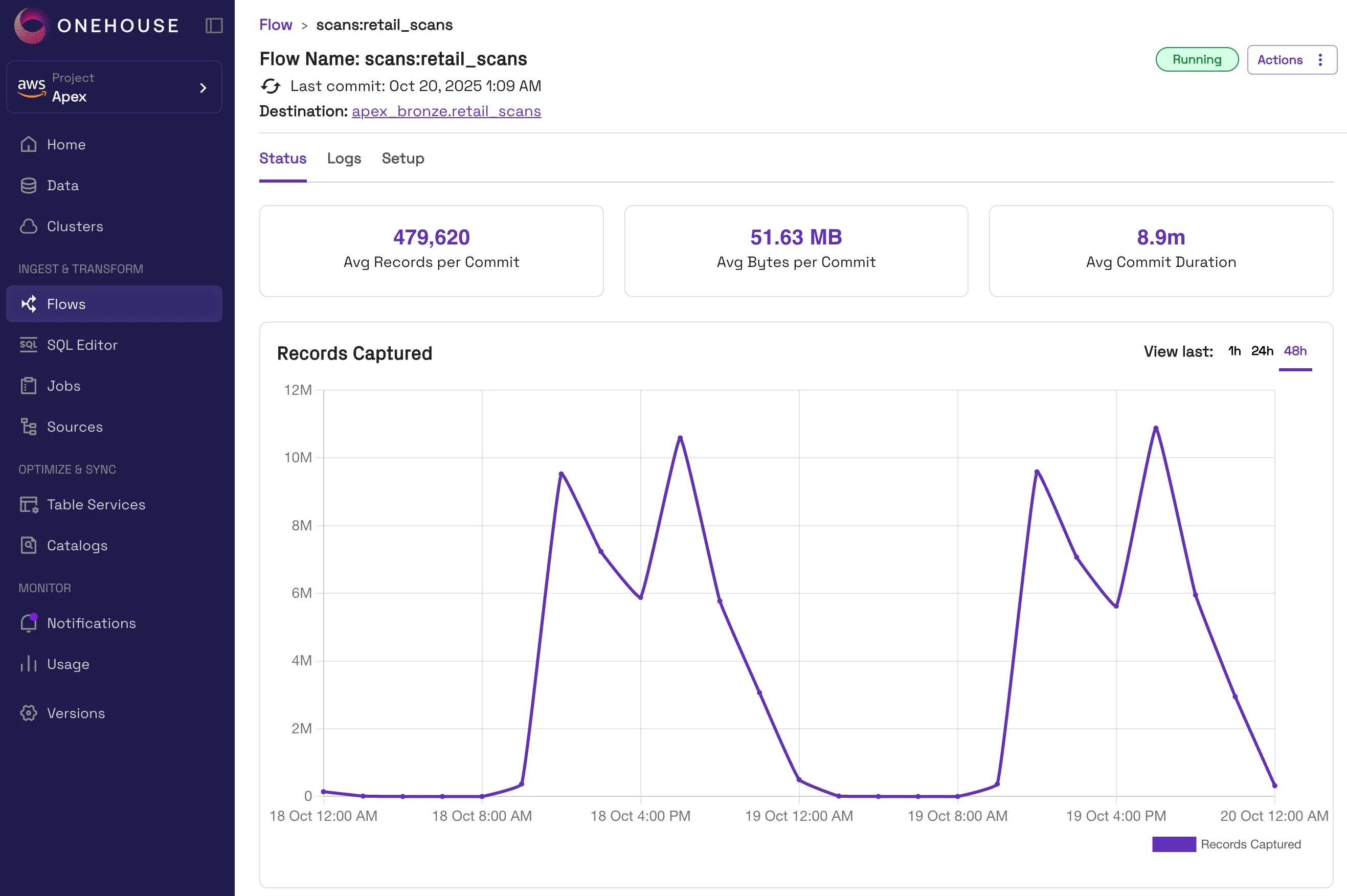
A running Flow in the console: records and bytes per commit, commit duration, and records captured over the last 48 hours.
Sources
Flows read from these sources:
| Source | Category | What it needs |
|---|---|---|
| Apache Kafka | Event stream | Network reachability to brokers |
| Confluent Kafka | Event stream | Outbound access to Confluent Cloud |
| Redpanda, Apache Pulsar, and other Kafka-compatible streams | Event stream | A Kafka-compatible endpoint reachable from the cluster |
| Amazon MSK | Event stream | AWS |
| Amazon Kinesis | Event stream | AWS |
| Confluent CDC | Database | Outbound access to Confluent Cloud |
| Postgres CDC | Database | Any Kafka-compatible endpoint or LakeLog, plus a schema registry |
| MySQL CDC | Database | Any Kafka-compatible endpoint or LakeLog, plus a schema registry |
| Oracle CDC | Database | Any Kafka-compatible endpoint or LakeLog, plus a schema registry. Database in ARCHIVELOG mode with supplemental logging. |
| SQL Server, MongoDB, and other Debezium-supported databases | Database | Debezium publishing to any Kafka-compatible endpoint |
| Amazon S3 | Files | S3 event notifications |
| Google Cloud Storage | Files | Google Cloud |
| Unstructured data: documents, PDFs, images, video | Files | Parsed and chunked at ingest, landing in tables alongside your records |
| Anything else, through an ingest tool | External | Airbyte or any other OSS or SaaS ingestion tool writing to Kafka or object storage; Onehouse picks it up from there |
| Onehouse tables | Lakehouse | Nothing. Reads tables already in your lakehouse incrementally, for lake-to-lake ELT |
A single Flow can read a topic spread across several Kafka clusters into one table. A directory of many tables in object storage can be ingested in one pass, either bootstrapping existing files or starting from new arrivals only.
Schema registries: AWS Glue, Google Managed, Confluent, file-based, and Proto JAR.
Write modes and keys
When you create a Flow, you choose how records are written to its table:
| Configuration | Options |
|---|---|
| Write mode | Mutable: inserts, updates, and deletes merged into the table, with changelog support. Append-only: inserts only, skipping the record lookup. |
| Table type | Merge-on-read (default) or copy-on-write, per Flow or as a project default |
| Record key | Unique identifier for deduplication, update, and delete. Required for mutable tables. |
| Partition key | Fields to partition by, optionally Hive-style |
| Precombine key | For mutable tables, the field whose largest value wins when keys collide, such as a timestamp, LSN, or version column |
| Sorting key | For append-only tables, sorts records at ingest to speed up predicate queries |
Mutable Flows locate existing records through a record-level index and write merge-on-read by default, so updates land quickly as log files that compaction merges in the background. This keeps update-heavy CDC streams fresh and queryable. OneFlow is the only managed ingestion service that runs table maintenance on open tables without blocking the writer or taking it offline, so high-volume CDC and streaming writers keep going while compaction and other table services run.
Append-only Flows also pick a performance profile:
| Balanced | Fastest Read | Fastest Write | |
|---|---|---|---|
| Sorting | By partition path and sorting key | None | None |
| File sizing | Best effort | Guaranteed | Disabled |
Under Fastest Write, clustering optimizes the table for reads afterward.
Transformations
Add transformations to a Flow to reshape records as they land, without writing code:
| Transformation | Effect |
|---|---|
| Add current timestamp | Stamps the record with ingestion time |
| Add derived date | Reformats an existing date field |
| Column filtering | Selects or excludes columns |
| Convert CDC data | Turns Debezium events into row-level changes |
| Explode array | One row per array element |
| Flatten struct | Struct properties become top-level fields |
| Flattening | Recursive flattening of all nested fields |
| Parse JSON | JSON string columns become structured columns |
| Filter rows | Drops rows failing a condition |
| Mask data | Hashes or truncates sensitive fields |
| Generate vector embeddings | Embeddings from text using OpenAI or VoyageAI models, or a model endpoint you host |
Custom transformations run your own DataFrame code in the pipeline: a function that takes a DataFrame in and returns a DataFrame, uploaded as a managed JAR; see the custom transformations quickstart. Transformations and validations are reusable objects, defined once and referenced by many Flows.
Because Flows are incremental, a transformation runs only over the records that changed in each sync. That keeps derived data current at low cost: an embedding is regenerated only when its source text changes, and a parsed or flattened column only when the record behind it does. The same applies to unstructured sources. A document that changes is re-chunked and re-embedded, and the rest of the corpus is left alone. Agents reading the tables see data as of the last sync, not the last full rebuild.
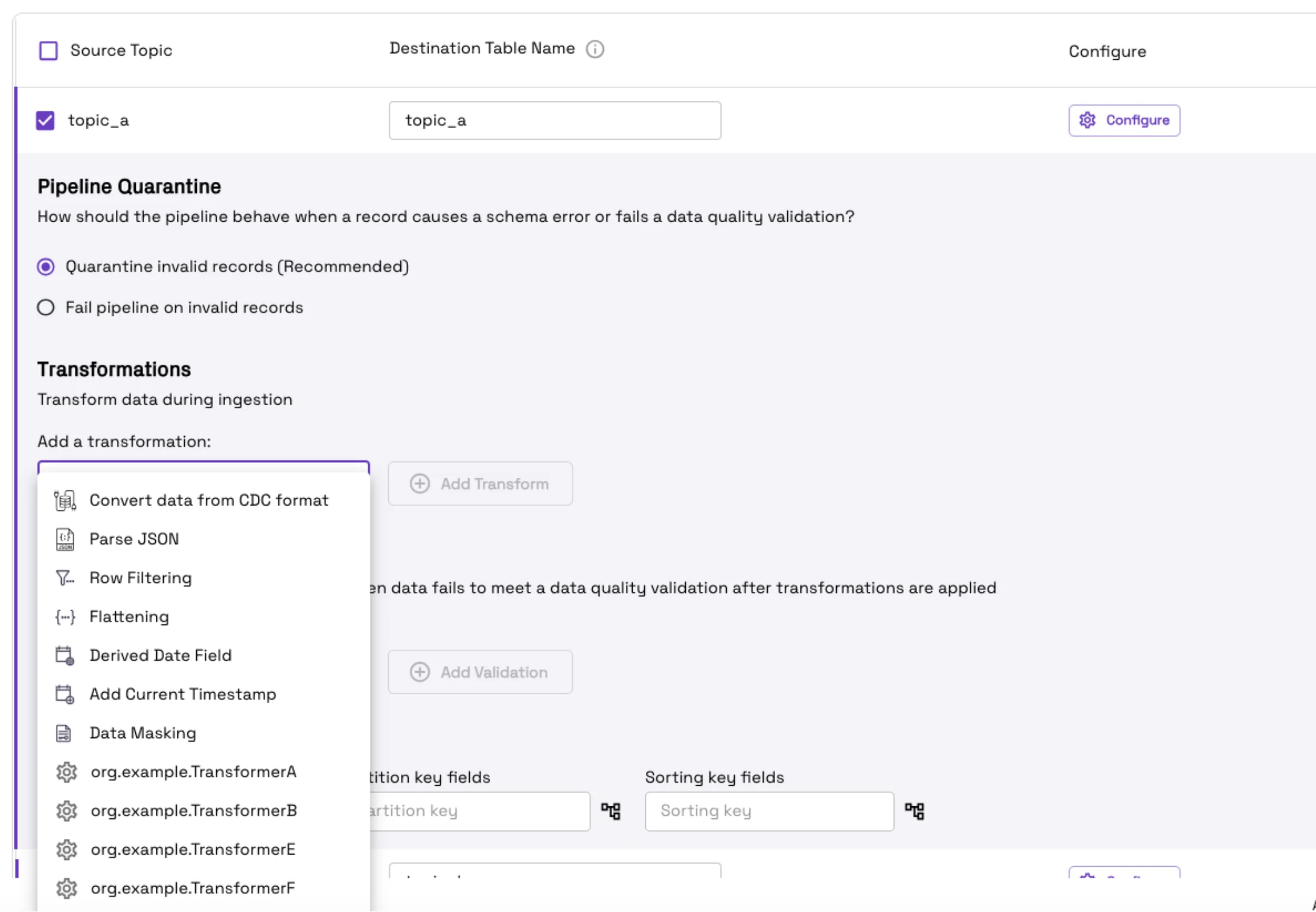
Adding transformations and choosing quarantine behavior while creating a Flow. Custom transformers appear alongside the built-in ones.
Data quality and schema evolution
Add validations to a Flow to catch bad records before they reach the table. A validation checks the schema or a timestamp format. On a failing record, the Flow either quarantines it to a sibling table, annotated with why it was rejected, and continues, or it fails the pipeline. To diagnose a rejected batch, query the quarantine table like any other.
Schema evolution is applied automatically for backward-compatible changes. New nullable columns are added and dropped columns are retired, with existing rows retained. Column types widen along Int → Long → Float → Double → String, with a widening write promoting the table’s column type, and any column can move from non-nullable to nullable.
Savepoints and restore. A savepoint bookmarks a table at a point in time. The automatic savepoint service takes them on a schedule, and any savepoint can be restored. This gives you named versions of a table, such as the exact snapshot a model was trained on, and a way back to a known-good state when a bad batch, a schema change, or an upstream bug has written data you need to undo.
Running a Flow
Once a Flow is running, you control it from the console. Pause stops processing and retains the source checkpoint along with the table’s services; Resume continues from it. Clone pre-fills the creation form. Delete stops the pipeline and leaves the table in place. Clean & Restart archives the table and re-ingests from the earliest available source data.
Tables are versioned under <tablePath>/<tableName>/v<n>/. A Clean & Restart writes a new version while the old one stays queryable, and catalogs are repointed at the first commit to the new version.
Name, sync frequency, quarantine behavior, transformations, validations, and catalogs are editable after creation. The source can be changed to any Kafka source, which is how you bootstrap a table from object storage and then switch it to a live stream.
Advanced configuration covers the delay threshold, deduplication policy, behavior on missing or expired Kafka messages, and target file size (128 MB by default, tunable between 10 MB and 1 GB).
Incremental ELT, lake to lake
Flows read tables already in your lakehouse the same way they read Kafka or a database, so the same managed pipelines that land raw data also prepare the layers built on it. In a typical medallion setup, one set of Flows lands each source as a raw bronze table, and a second set reads those bronze tables and writes cleaned silver tables: validating schemas and timestamps, flattening nested fields, deriving columns, masking sensitive values, and quarantining bad records along the way.
Each silver sync reads only the records that changed in bronze since its last sync, through the table’s change stream. The whole chain stays minutes fresh, and its cost tracks the volume of new data, not the size of the tables. These stages need no Spark job to write or tune and no orchestrator to keep them in order: each Flow checkpoints its own progress and resumes where it stopped.
Apna, the job platform serving more than 50 million users, runs both layers this way: OneFlow lands its sources as bronze tables, and Flows prepare the silver layer from them incrementally, with no Spark jobs. Its silver pipelines also keep history, SCD type 2 style, through custom transformations in the same Flows. See Overhauling data management at Apna.
For joins across many tables, aggregations, and other large-scale transformations, such as building a gold layer, use Spark jobs or SQL pipelines. They read the same change streams, so they stay incremental too.
LakeLog
Use LakeLog for database CDC when you don’t have Kafka, or don’t want to run it. To turn it on, set a CDC source’s log message bus to lakelog and give it a storage path. There is no Amazon MSK or other Kafka-like cluster to size and operate, which matters most in environments that offer no managed Kafka.
LakeLog is a REST API on the producer side and an open table on the consumer side. Producers write change events over HTTP, with the same producer API as the Confluent REST Proxy, so an application that writes to a Kafka REST proxy today can also write to LakeLog without any changes. LakeLog lands the events on your object storage as an open table, registered in your catalogs like any other, so Flows and any engine that reads open tables query it directly. Writes are streaming and reads are batch: events arrive continuously, and each consumer reads whatever has landed since its last read, as an incremental query on the table.
Unstructured data and embeddings
Documents, images, audio, and video land in the same open tables as your records, so media does not sit in a separate bucket with its embeddings in a third system. A document becomes one row, with its chunks and vectors as columns of the same table, so a single SQL query can rank by similarity and join to the facts. Multimodal payloads are stored natively and read in place. Embeddings are generated in the ingestion path with OpenAI or VoyageAI models, and only changed rows and columns are re-embedded, so a corpus does not have to be rebuilt each time upstream data moves. Within each batch, the Flow deduplicates and merges the changes to a record before calling the embedding API, so a document edited hundreds of times in one batch interval is embedded once, at its latest version. For data that changes often, this keeps the embedding API calls and token costs tied to the number of documents that changed, not the number of edits. One open-source case study generated vectors across a 500-million-record dataset in roughly 40 minutes.
These tables are what Lakegres serves to agents and what training data pipelines curate from.
Incremental processing
Every Flow, and every pipeline built on Onehouse tables, processes only what changed. Compute scales with the size of each change, and nothing rescans the full table, which is where most of the cost of a batch lakehouse goes. Tables stay minutes fresh at batch cost, with no separate streaming system beside the batch one.
- A change stream from every table. Each commit records which records changed, so any downstream job can read everything since its last checkpoint (inserts, updates, and deletes), with before and after images when it needs a full change feed. Nothing rescans the table to find what is new.
- Record-level updates and deletes. An index maps each record key to the file that holds it, so an upsert rewrites only the files containing those keys, and a delete, including one for a regulation such as GDPR, touches only the affected records.
- Fast writes, background merges. Merge-on-read tables write changes as small log files and merge them into base files with compaction in the background, so frequent updates land quickly without rewriting files on every commit.
- Correct results for late and replayed data. An ordering field, such as an update timestamp or log sequence number, decides which version of a record wins, so late events and replays never overwrite newer data.
- Exactly-once progress. The source checkpoint commits atomically with the data, so a restarted pipeline resumes where it stopped, with no duplicates and no gaps.
- Multi-stage pipelines that stay incremental. Each stage of a raw, cleaned, and aggregated pipeline consumes the previous stage’s changes, so the whole chain refreshes in minutes, and a backfill reprocesses only the time range it needs.
- Writers never wait. Compaction, clustering, and cleaning run alongside writers with snapshot isolation, so table maintenance never blocks ingestion.
The design comes from open source, where it has run in production at some of the largest data lakes for a decade. Notion, for example, built incremental ingestion on the open-source project and cut historical syncs from a week to two hours.
Further reading
- OneFlow
- Ingestion and ETL pipelines
- Choosing the right data ingestion method
- The first turnkey end-to-end CDC ingestion lakehouse
- Powering real-time analytics with Confluent Kafka and Onehouse
- The ultimate data lakehouse for streaming data
- Reliable ingestion from AWS S3 using Apache Hudi
- CDC streaming for real-time retargeting
- Comparing MoR and CoW tables, with use cases from Uber and Shopee
- Top 3 things for fast upsert performance
- Data deduplication strategies in an open lakehouse
- Onehouse vector embeddings generator
- Pre-commit validation for data quality
- Schema evolution on the data lakehouse