Talk with our engineers by joining the new Onehouse community Slack!
Deploying Onehouse
How Onehouse deploys
A Onehouse account manages any number of data planes from a single control plane. The control plane runs in Onehouse’s infrastructure and holds the management API, the console, scheduling state, usage tracking, and the resource registry. It is shared across Onehouse customers; a dedicated control plane is available for large deployments. Each data plane runs inside your cloud account or data center and does all the work that touches your data: ingestion, ETL, SQL, interactive queries, and table maintenance.
Data planes are organized into projects, the unit of isolation in Onehouse. Each project is scoped to one cloud account and region, has its own data plane, and is linked to its own network. Use projects to separate environments, such as development and production, or business units. Inside a project, compute is isolated by cluster and storage by lake. One account can run projects on AWS, Google Cloud, Azure, and on-premises at the same time. Many customers run a project per region to meet data residency and sovereignty rules: each region’s data stays in that region, and one console and API manage every environment.
Your tables, and the compute that reads and writes them, stay inside your network. Nothing outside it connects to your workloads or your storage. This lets Onehouse run where a SaaS data platform cannot: private cloud, on-premises, or a NeoCloud. See Onehouse’s privacy-first data architecture for the design, Onehouse Cloud for the product overview, and Security for the security posture.
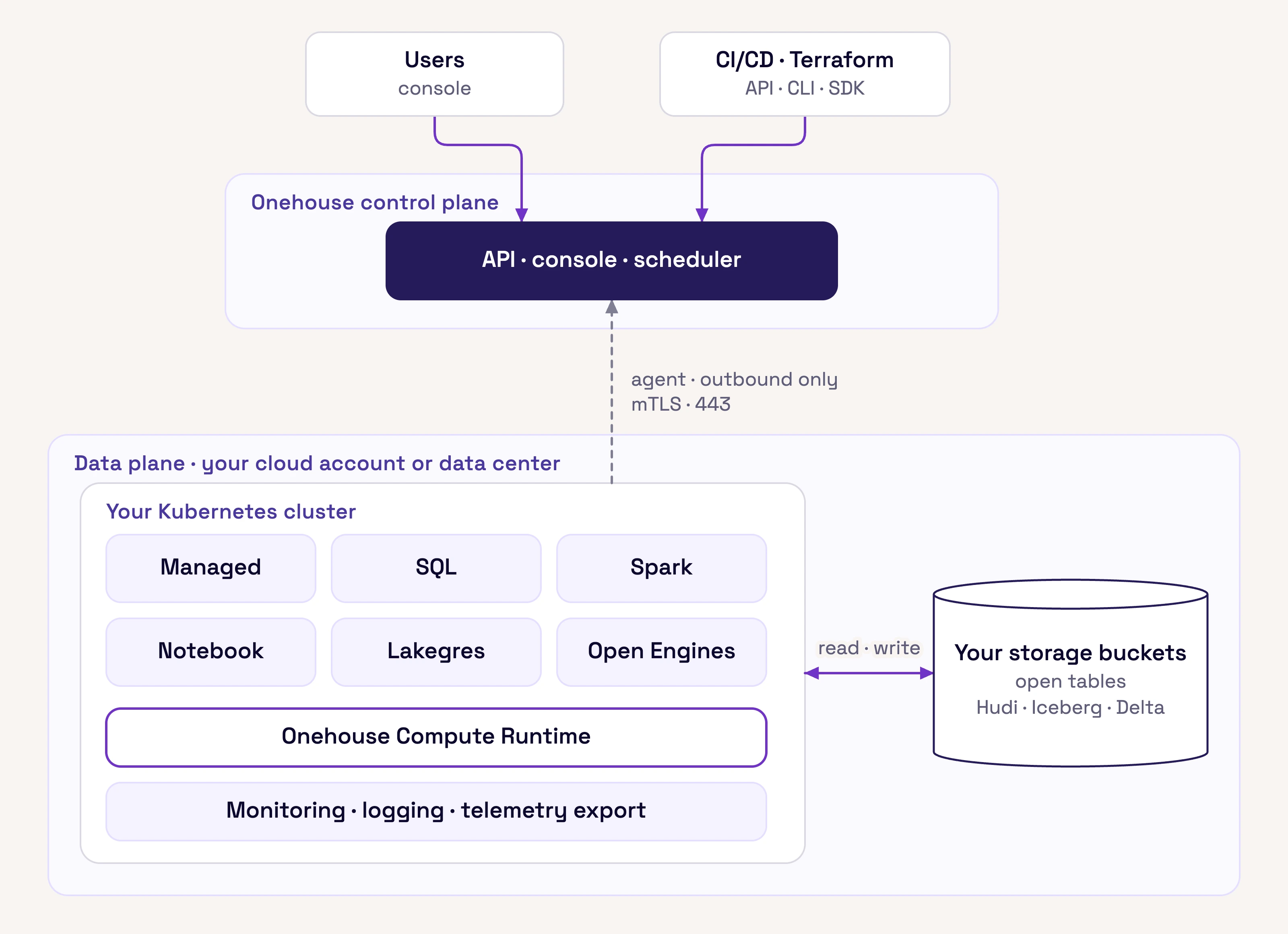
The control plane and one project’s data plane. The data plane runs on any Kubernetes cluster in your account and connects to the control plane outbound.
Deployment options
Onehouse deploys three ways. All three run the same platform under the same control plane, and one account can use any mix of them. They differ only in who provisions the Kubernetes cluster.
| Path | Where it runs | Kubernetes cluster |
|---|---|---|
| AWS | Your AWS account | Onehouse installer provisions and manages an EKS cluster in your VPC |
| Google Cloud | Your Google Cloud project | Onehouse installer provisions and manages a GKE cluster in your VPC |
| Bring your own Kubernetes | Microsoft Azure, NeoClouds, private cloud, on-premises | You provide the cluster; Onehouse installer spins up the platform on it |
Connectivity
The data plane connects outbound to the control plane. The control plane never opens a connection into your network, so you don’t have to expose any open ports or public IPs.
- Agent. A pod that holds a gRPC stream to the control plane on port 443, with mutual TLS and certificate pinning. It is refreshed periodically.
- Management tunnel. A second TLS connection. The control plane uses it to install and upgrade platform components and to read data plane metrics. It also exposes data plane services like Apache Superset or Jupyter Notebooks to the user’s browser. If the tunnel is down, the control plane sends commands over the agent’s stream.
Starting and stopping ingestion, schema changes, cluster management, and job submission are all commands sent over these connections. The connections carry commands, metadata, metrics, and logs. Table data stays in your account.
Private connectivity
On AWS, the data plane can connect to the control plane over AWS PrivateLink instead of the public internet. PrivateLink is set up per VPC in the project’s Terraform, and all Onehouse projects in that VPC share it. Support for other clouds is in progress; contact Onehouse for status.
Where things live
| What | Where it lives |
|---|---|
| Data files and tables | Your object storage only |
| Metadata (schema, table names, resource state) | Flows to the control plane data store |
| Compute | Provisioned in your account, scaled up and down automatically, and terminated after use |
| Logs (Spark driver and executor, Flow, SQL) | Generated and stored in your data plane, browsable in the console, and forwarded to your own object storage for long-term retention |
| Metrics and telemetry | Collected by Prometheus inside your cluster. Exports to Datadog, Grafana Cloud, Honeycomb, or Splunk go directly from your data plane to the vendor, without passing through Onehouse. |
| Infrastructure cost | Kubernetes compute and object storage are billed directly to your cloud account; Onehouse fees are billed separately |
Table preview in the console, which shows a few sample rows on request, is optional and can be turned off for a project.