Talk with our engineers by joining the new Onehouse community Slack!
Core capabilities
Compute runtime
Every workload in Onehouse runs on a compute cluster. You create clusters in the console or through the API. When you create one, you choose three things: the cluster type, based on the workload you want to run on it; the instance type its nodes run on; and the minimum and maximum size it can scale between. You can create as many clusters as you need, for example one per team or one per pipeline, and each one scales independently.
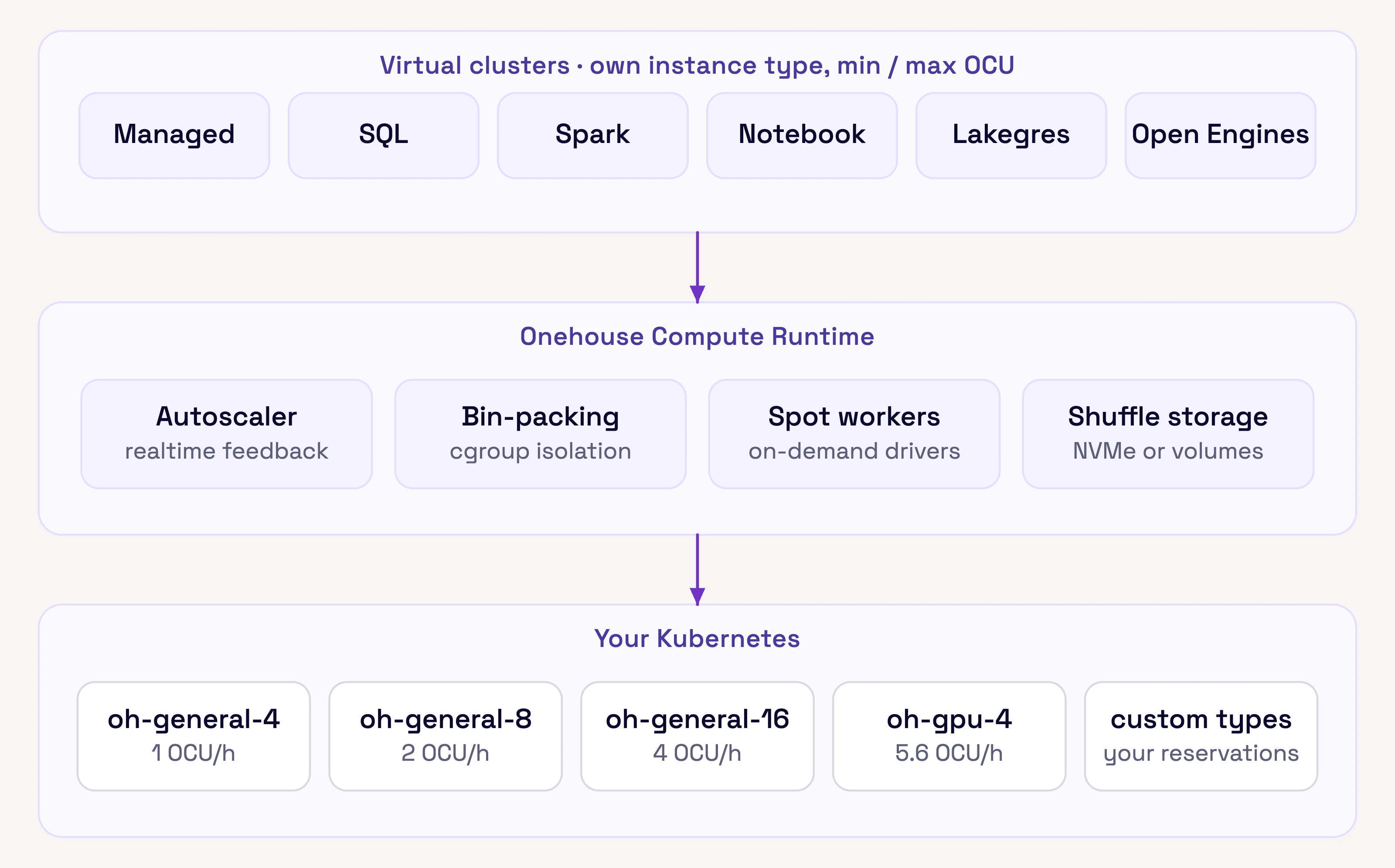
Several compute clusters run on one Kubernetes cluster in your account. Each has its own instance type and size range. You can also set a limit for the whole project.
Cluster types
Pick a cluster type based on the workload you want to run. You can’t change a cluster’s type later, so create a separate cluster for each kind of workload.
| Type | Use it for |
|---|---|
| Managed | Ingestion Flows, table services, and catalog sync through OneSync |
| SQL | SQL ETL pipelines from dbt, Airflow, and other JDBC clients |
| Spark | Spark jobs in Python, Java, or Scala |
| Notebook | Jupyter notebooks with PySpark |
| Lakegres | Low-latency interactive SQL for apps and agents, over the Postgres wire protocol |
| Open Engines | Trino, Flink, or Ray |
Onehouse also runs two small clusters of its own in every project. The System cluster runs monitoring, scheduling, and autoscaling. The Connector cluster runs source connectors, such as object storage event listeners and CDC readers, and exists only when you have file or database sources.
Instance types
When you create a cluster, you choose the instance type its nodes run on. Usage is measured in Onehouse Compute Units (OCU): one OCU is four cores running for one hour, on any instance family. An 8-core instance running for an hour uses 2 OCU.
| Instance | Spec | OCU / hour | Cluster types |
|---|---|---|---|
oh-general-4 |
4 vCPU, 16 GB | 1.0 | All |
oh-general-8 |
8 vCPU, 32 GB | 2.0 | All |
oh-general-16 |
16 vCPU, 64 GB | 4.0 | All |
oh-gpu-4 |
1 GPU, 24 GB GPU RAM, 4 vCPU, 16 GB | 5.6 | Ray only |
On AWS, the oh-general family runs on Graviton m8g instances; on Google Cloud, on e2-standard. Project admins can also define custom instance types from the instance families they already have reserved with their cloud provider, so data workloads use up those reservations before paying on-demand prices. The same mechanism covers memory-heavy or local-NVMe instances, and Onehouse adds others on request.
Scaling and resource sharing
Each cluster has a minimum and maximum OCU. The minimum keeps that much capacity running, so work starts without waiting for new nodes. The maximum is a hard cap on spend: a cluster at its maximum stops growing, and new work waits for capacity. Between the two, Onehouse scales the cluster up and down with the load.
You can also set an OCU limit for the whole project. Clusters then scale within that limit, and capacity goes to whichever workloads need it at the time.
Onehouse keeps your bill down in three ways:
- Spot capacity. Workers can run on spot instances, while drivers stay on on-demand instances so a job does not lose its driver.
- Shared instances. Onehouse packs pods from several clusters onto the same instances, isolated from each other. A cluster that needs two cores and another that needs one share a single four-core instance.
- Idle shutdown. An instance that sits idle for ten minutes is terminated.
Attached storage
Each instance gets block storage for shuffle and disk spill. Onehouse sizes it from the instance; you can set custom sizes through the API. On AWS:
| Instance cores | Storage | Volumes | IOPS | Throughput |
|---|---|---|---|---|
| 4 | 250 GB | 2 × 125 GB | 6,000 | 250 MiB/s |
| 8 | 500 GB | 4 × 125 GB | 9,000 | 500 MiB/s |
| 16 | 1,000 GB | 4 × 250 GB | 12,000 | 750 MiB/s |
| 32 | 2,000 GB | 4 × 500 GB | 12,000 | 750 MiB/s |
| 64 | 4,000 GB | 4 × 1 TB | 16,000 | 1,000 MiB/s |
| 96 | 6,000 GB | 3 × 2 TB | 16,000 | 1,000 MiB/s |
| 192 | 12,000 GB | 4 × 3 TB | 16,000 | 1,000 MiB/s |
Instances with local NVMe use their local disks instead, since they are faster.
Usage and alerts
The usage dashboard shows OCU consumption over time by cluster and instance type, with estimated cost. Usage is measured from the instances running in your account. Each cluster alerts you in the console, by email, and in Slack when it reaches a set share of its maximum OCU, 80 percent by default.
What runs underneath
Every cluster type runs on the Onehouse Compute Runtime, which runs the workloads on Kubernetes for you. Its autoscaler adds and removes capacity as load changes, it tunes jobs while they run, and its I/O layer is built for object storage. Nodes are spread across the availability zones you provide (at least two on AWS). Managed, SQL, Spark, Notebook, and Lakegres clusters run on Quanton, Onehouse’s execution engine. It runs Spark jobs, Spark SQL, PySpark notebooks, and Lakegres queries, and your existing Spark code runs on it unchanged and faster; quanton.dev/benchmarks has the current numbers. For the details, see Introducing the Onehouse Compute Runtime and the Quanton engine page.