Talk with our engineers by joining the new Onehouse community Slack!
Deploying Onehouse
Environment requirements
These are the requirements for every deployment path. On AWS and Google Cloud, Onehouse provisions the Kubernetes cluster and node pools for you, so the cluster sections below apply only to bring your own Kubernetes: Microsoft Azure, NeoClouds, private cloud, and on-premises.
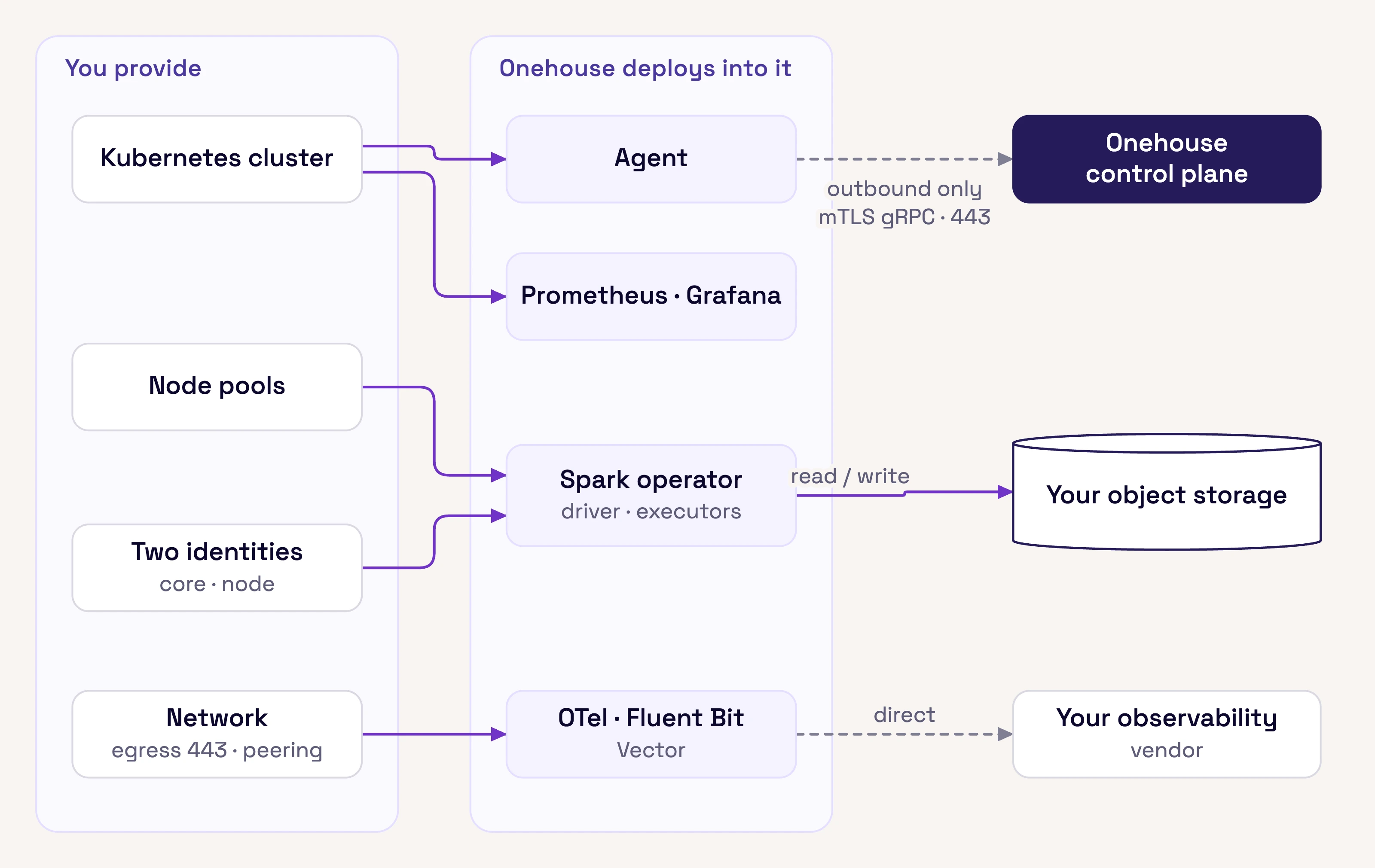
What you provide and what Onehouse deploys into it. Everything the platform does at runtime travels over connections your cluster opens outbound.
Kubernetes cluster
| Requirement | Detail |
|---|---|
| Version | 1.33 or a recent stable release |
| Networking | An overlay or per-pod CNI. Pods take addresses from a dedicated pod CIDR separate from the node subnet. |
| API endpoint | Private. Onehouse’s management access comes from one fixed address you allowlist, used at install and upgrade time only; see Operations and management. |
| Autoscaling | Handled by your cluster’s own autoscaler. Onehouse drives capacity through pod scheduling, so do not manually change node counts on Onehouse-managed pools. |
Node pools
On AWS and Google Cloud, Onehouse creates and manages the node pools. On bring your own Kubernetes you create them, using the scheduling labels Onehouse provides during onboarding. The worker pool is required; add the others according to the features you intend to use.
| Pool | Purpose |
|---|---|
workerpool |
Onehouse agent, monitoring, and essential platform pods |
sqlworkers |
Compute clusters you create: SQL, Spark, PySpark, and Lakegres clusters. Driver and executor pods both land here. |
jobworkers |
Pipelines Onehouse runs on your behalf: ingestion and table-service maintenance |
openengines |
Optional. Trino, Flink, and Ray clusters. |
A compute cluster runs only on nodes of the instance type you pick for it, so create one pool for each instance type you plan to use, labeled with that type. Onehouse ships a standard set of instance types sized for data-intensive work, and you can define your own (see Instance types). Onehouse handles placement and scaling within those pools.
Object storage
| Requirement | Detail |
|---|---|
| Interface | S3, GCS, Azure Blob / ADLS Gen2, an S3-compatible store, or a Hadoop-compatible file system (HCFS) such as HDFS |
| Platform bucket | One bucket for Terraform state, platform metadata, and job artifacts. It holds no lakehouse tables. |
| Lakehouse buckets | One or more buckets in the same region as the cluster, holding your tables. Cross-region placement incurs transfer cost. |
| Access path | Reachable from the node subnet, ideally over a private endpoint rather than through the NAT gateway |
| Credentials | Granted to the node identity: read and write on both the lakehouse and platform buckets. Give each compute cluster its own workload identity to scope storage access per team; see Identity. |
Identity
The deployment creates two identities:
| Identity | Purpose |
|---|---|
| Core role | Used by the Onehouse control plane to manage the cluster. Reads and writes the platform bucket only, never lakehouse storage. |
| Node role | Attached to cluster nodes. Used by workloads to read and write lakehouse storage and the platform bucket. |
On AWS the core role is an IAM role assumed cross-account with an external ID, and the node role is an IAM role the workloads use; on Google Cloud, service accounts with scoped custom roles; on Azure, user-assigned managed identities assumed through Workload Identity Federation. Both roles live in your account and you own their policies. In every case the identity is assumed, not shared: no client secrets, keys, or passwords are stored in Onehouse systems.
Individual compute clusters can be given their own workload identity, so a cluster’s jobs authenticate as a specific role instead of the default node identity. Use this to scope storage access per team. Clusters vend short-lived storage credentials to their engines, scoped to the tables a query may touch, so workloads hold no standing storage access.
Networking
| Requirement | Detail |
|---|---|
| Address space | Node subnets plus pod and service ranges, sized for your expected scale; Onehouse recommends sizes during onboarding |
| Egress | Outbound access on port 443 from the node subnet, via NAT or equivalent, or over AWS PrivateLink |
| Inbound | None. The control plane reaches your cluster only through connections the data plane opens outbound; see Connectivity. |
| Storage endpoint | A private service endpoint to object storage, so data traffic does not traverse the NAT gateway |
| Source reachability | If your Kafka brokers or databases live in another network, peering is required |
Peering matters for cost as well as reachability. Where a NAT gateway charges per gigabyte processed, ingestion that pulls from a source outside the environment is billed for every byte; peering or a private endpoint bypasses that path.
Outbound access
If you run an egress firewall, the data plane needs outbound access to the Onehouse control plane, the public container registries it pulls images from, and the release endpoints for its deployment tooling. It also needs the services behind the features you enable, such as a Kafka or CDC provider, your telemetry vendor, an external catalog, or an embedding model provider. Onehouse provides the exact list during onboarding. Put it in place before the first deployment, since a partial allowlist fails at image pull.
Separately, a project-level host allowlist restricts which external domains your users may reference when creating a source or catalog.
Tooling
Terraform 1.11.0 or later, your cloud CLI, and kubectl, helm, jq, yq, and curl.