Talk with our engineers by joining the new Onehouse community Slack!
AI Data Layer
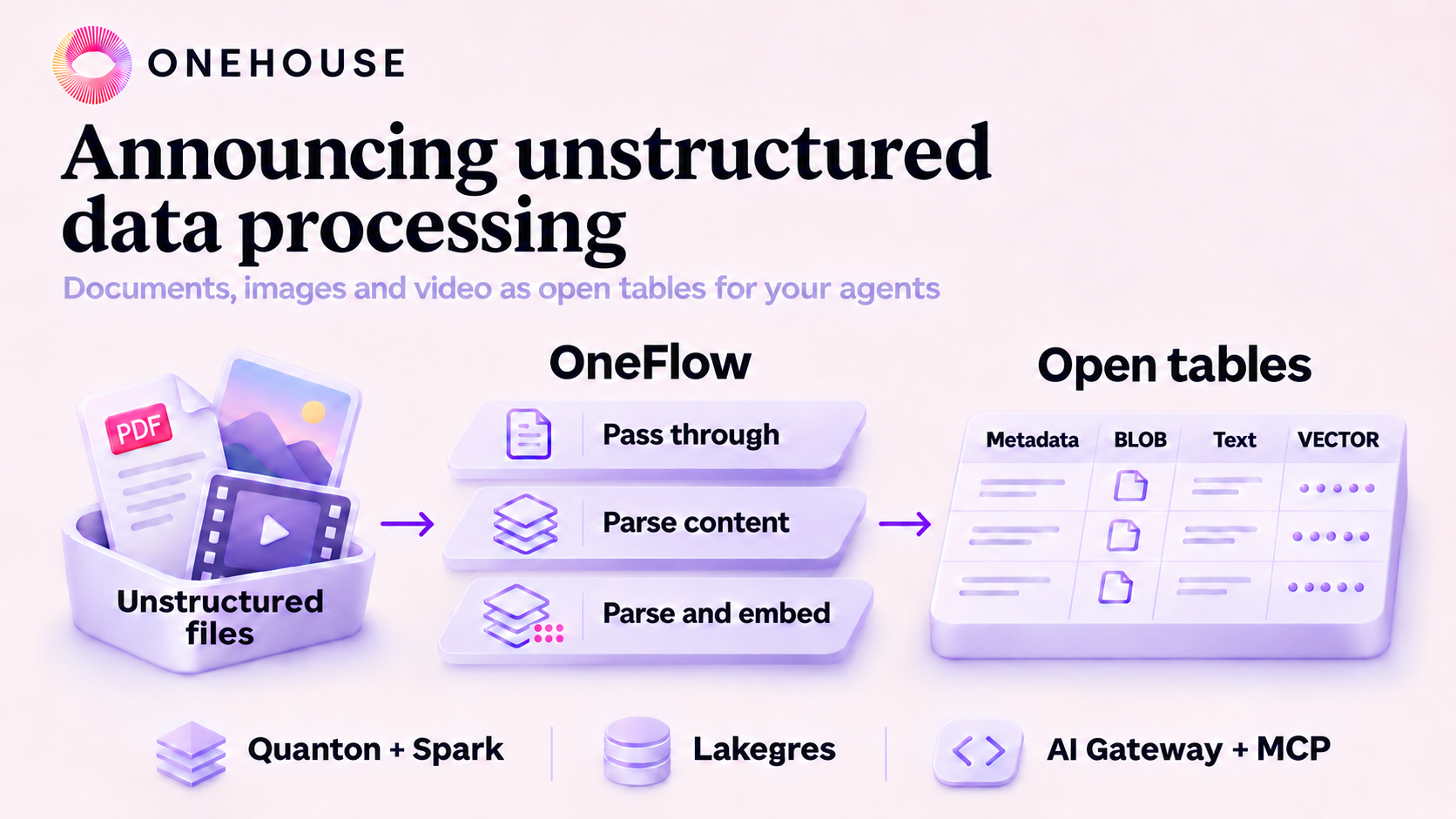
Most of what your company knows sits in documents, images and video, and agents cannot search a bucket of files. OneFlow incrementally ingests them into open tables agents query in SQL, even without GPUs. Spark on Quanton does the same with any Python library you choose.
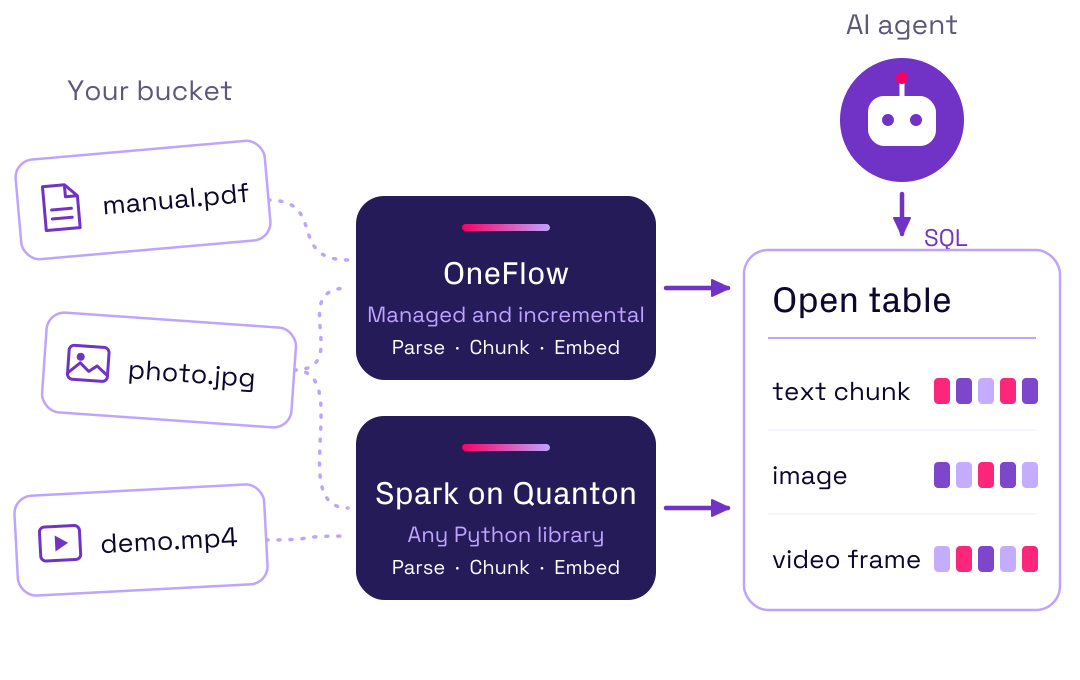

Documents and media land in open tables in the lakehouse that holds your records, with their embeddings in the same row. There is no separate media bucket and vector store to keep in step.

A flow parses documents into text chunks, records image dimensions and format, and samples keyframes from video. Files it cannot parse are recorded in an error table with the reason.

A PySpark job reads the same dump of files across the cluster with the quanton_unstructured source, processes each file with any Python library you choose, and writes an open table.

Small files are copied into the table as inline blobs and read in a few sequential reads. Larger files stay in your bucket with a reference in the row, and read_blob returns the bytes in SQL either way.

A flow reads the bucket's event notifications and processes the files that are new since its last checkpoint, in one atomic commit per run. Embedding calls follow the number of new files, however large the bucket is.

Lakegres serves these tables to agents over the Postgres protocol, the AI Gateway governs access to them, and training data pipelines curate from them, without a copy.
2.8 min
to parse 10,000 PDFs into 642,663 text chunks, on 32 CPU cores with no GPUs
4.3 min
to turn 80,358 JPEG photos into table rows on the same cluster
4.6 min
to extract 51,576 frames from 25k video clips on the same cluster
Sources
 Files in object storagePDFs, images, video and office documents


Parse and embed
Store
Use
One query returns a product's manual text, photos and video frames from the table a flow wrote. Every row keeps the path, size and modification time of its source file, so it traces back to the file it came from.
Joined in SQL. An agent filters on file metadata, takes the matching chunks and joins them to your structured tables in one query.
One catalog and one set of permissions. The AI Gateway and the Onehouse MCP server decide which models and which tables each agent can use.
SELECT source_file_name,
       source_file_extension,
       chunk_id,
       modality,
       prepared_text_chunk,
       CASE WHEN modality = 'image'
            THEN read_blob(prepared_image)
       END AS image_bytes,
       aux
FROM   product_assets
WHERE  product_id = 'stroller-104'
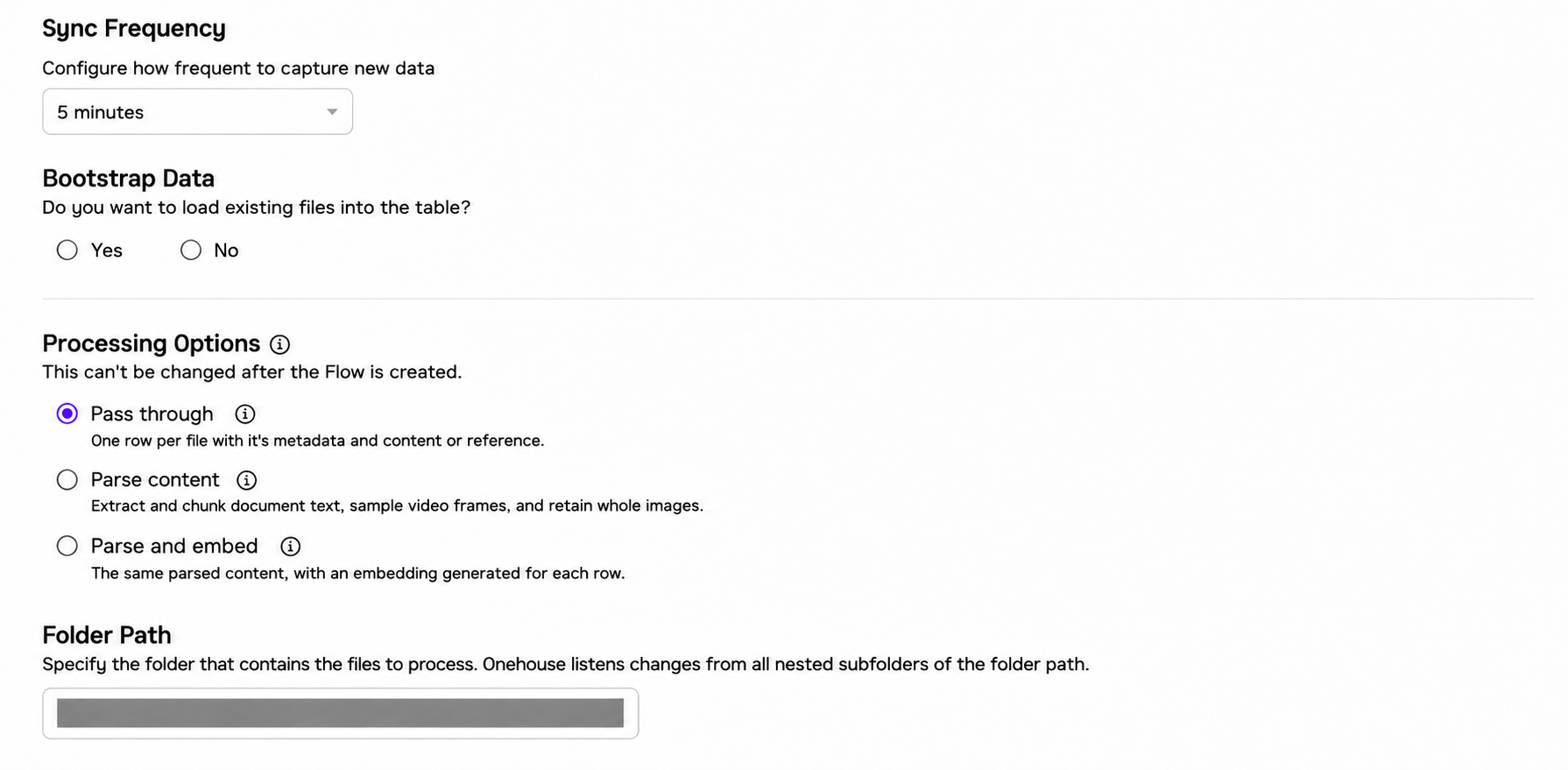
ORDER BY source_file_name, chunk_id;A flow has a source bucket, a processing option, an optional embedding model alias and a target table. You choose the option when you create the flow.
Pass through. One row per file, with the file metadata and the content as a blob. A Quanton job can parse and embed it later with your own libraries.
Parse content. One row per text chunk, image or video frame. Chunk size, overlap and the keyframe interval are configurable.
Parse and embed. The same rows with a vector each, from the model alias you configure on the AI Gateway. A multimodal model puts text and images in one vector space.
A PySpark job on Quanton reads a folder of files across the cluster and runs the Python code you choose on each one. The quanton_unstructured source returns one row per file: the extracted text, chunks ready to embed, the content type detected from the file's bytes, and a parse status.
Incremental on the file path. With uri as the record key, a rerun upserts only the files that changed. A file that failed to parse keeps its error in the row, so you fix the cause and run again.
An open table as the sink. Embed the chunks with the model you choose and write text and vectors to one Hudi table on Lance base files. RAG on your lakehouse walks through it.
Builds on flow tables. A scheduled job reads a Pass through table, parses and embeds with your own libraries, and writes a downstream table of text, blobs and vectors.
import quanton_unstructured
quanton_unstructured.register(spark)

docs = (spark.read.format("quanton_unstructured")
  .load("s3://bucket/wiki/"))
chunks = (docs.where("parse_status = 'SUCCESS'")
.select("uri", F.posexplode("chunks").alias("pos", "chunk")))OneFlow processes PDF documents, images (PNG, JPEG, GIF, BMP and TIFF) and video (MP4, MOV, AVI, MKV and WebM). One flow can take all three, and they land in the same table. You select the file types when you create the flow, and files with other extensions are skipped. For other document formats, a Spark job on Quanton reads PDF, HTML, Office, EPUB, text and Markdown files with the quanton_unstructured data source. Audio is not supported yet and is coming.
The three options differ in how much work the flow does on each file. Pass through writes one row per file, with the file metadata and the content as a blob. Parse content writes one row per text chunk, image or video frame, without embeddings. Parse and embed writes the same rows and adds a vector to each, in the same commit as the content. The option is fixed when the flow is created, so changing it means creating a new flow and a new table.
No. Parsing, chunking and frame extraction run on CPUs. In the published benchmark, a flow using Parse content turned 10,000 PDFs (15.1 GB) into 642,663 text chunks in 2.8 minutes on 32 executor cores across two AWS m8g.4xlarge executors, with no GPUs. That time is the median of two runs, measured from job submission to the visible commit, and it excludes embedding. With Parse and embed, the flow calls a remote embedding model, so embedding time depends on the provider and its rate limits. The launch post has the full results.
A flow uses a text or multimodal embedding model that you register on the AI Gateway. You connect a model provider on the gateway, give one of its embedding models an alias, and select that alias when you create a flow with Parse and embed. A text-only model embeds document text chunks. Images and video frames need a multimodal model, which places text and images in one vector space so that a text query can retrieve a photo or a video frame.
No. The vectors are a column in the open table that holds the text chunks, images and source file metadata, so there is no second store to load and keep in sync. Lakegres serves the table to agents over the Postgres protocol, and one SQL query can rank rows by similarity, filter on file metadata and join to your structured tables. Vector search covers the query side.
Files are read in place from your bucket, with no staging copy. A file at or below the inline threshold has its bytes copied into the table's data files as an inline blob, which suits large numbers of small files because they come back in fewer, larger sequential reads. A larger file, such as a 2 GB video, stays in your bucket and the row holds a reference to it. The read_blob function returns the bytes in SQL in both cases, so queries look the same. The tables are Parquet, Lance or Vortex files on your own object storage.
A PySpark job reads a folder of files with the quanton_unstructured data source, which is available on every Spark cluster. The source returns one row per file with the extracted text, a chunks array of text pieces ready to embed (2,000 characters each by default), the detected content type and a parse_status. The job is native PySpark, so any Python parsing library works where the built-in parsers do not fit. It then writes the text and vectors to an open table. The Spark jobs guide has the code.
A media bucket, a parsing stack and a vector store beside the lake are three more systems to load, secure and keep in sync with the records they describe. Point a flow at a bucket of documents, images and video, and query the parsed text, frames and vectors next to your tables.