Onehouse Quanton vs the latest AWS EMR for Apache Spark™ Workloads

At AWS reInvent this week, AWS EMR rolled out a new runtime version EMR 7.12, with a fresh set of performance claims around query and pipeline performance, highlighting improvements for Apache Spark workloads with Apache Iceberg. This caught our attention since we also just published our own Iceberg acceleration benchmarks recently on our new Spark engine, Quanton™. Naturally we were excited to try out the latest EMR release to see where things stack up and to make sure someone doesn’t accidentally make the mistake of simply comparing numbers across blogs.
Benchmarks only matter when they measure the same thing under the same conditions, and in the Spark ecosystem that is easier said than done. Spark performance is heavily influenced by job configs, cluster settings, source datasets, and hardware provisioning. Two benchmark charts that seem similar on the surface might actually be measuring entirely different workloads under different assumptions. We’ve written extensively about ETL benchmarks on cloud data platforms and have been continuously validating the methodology on real-world workloads throughout the year.
We reran all of our benchmarks from our blog against the newly minted EMR 7.12, to obtain an updated apples-to-apples comparison with the latest and greatest release from AWS. This short blog shares these results and draws some interesting insights into how price-performance is evolving around Spark and Open Table Formats.
Updated price/performance benchmarks
Before we get started, a quick recap of our benchmark setup.
- 10TB tpc-ds for measuring ET
- 1TB scale DIM merges using LakeLoader for measuring L
- Use latest general-purpose Graviton instances
This is similar to the AWS setup, with a few differences. On the 3TB scale tpc-ds benchmark AWS notes that “Our results derived from the TPC-DS dataset are not directly comparable to the official TPC-DS results due to setup differences”. We use a more standard tpc-ds benchmark at a higher 10TB scale, to exercise more shuffling of data like in real-world workloads. At lower scales, many joins are turned into broadcast joins, which are just too fast and can hide real performance at scale. We also isolate write performance, using real-world update/delete patterns and things like uuid based keys that are found in the wild. See the end of this article for an interactive calculator that lets you model costs based on how your workload splits across ET vs L dimensions.
The results show a nice 32% improvement for EMR over its previous versions, which finally brings their price/performance within range of the Databricks photon engine. However, Onehouse still comes out with a 2.5x better price/performance advantage to the latest EMR 7.12 runtime. While the AWS blog focuses on Iceberg, we also tested Apache Hudi and Delta Lake side-by-side and found very similar query performance using the latest EMR runtime. So, the announcement feels like an engine upgrade, coupled with a catch-up specifically around Iceberg performance as they note: “[this] closes the gap to parquet performance on Amazon EMR so customers can use the benefits of Iceberg without a performance penalty”.

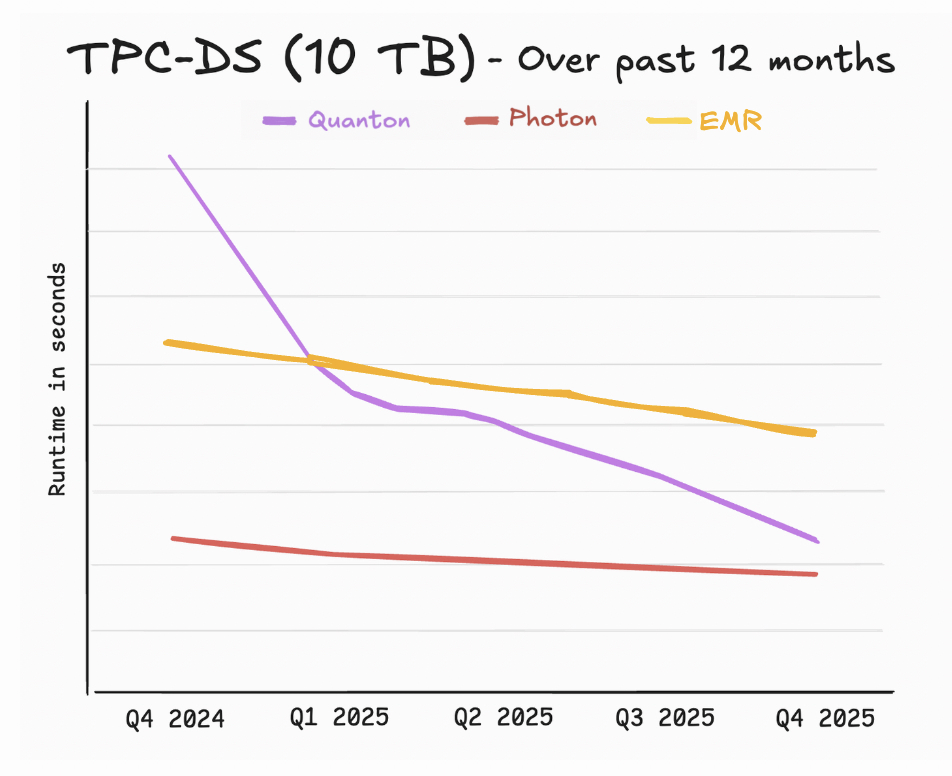
If you look closely at the numbers, the AWS blog also reveals a more interesting statistic about the pace of innovation. While lower is better, it’s important to also take note of how fast the numbers are being lowered across different platforms. The blog quotes performance numbers for EMR 7.5, which was released in Nov 2024 for re:Invent last year. As we are also keeping diligent notes and scores, here is how the rate of improvement stacks up between AWS, Databricks, and Onehouse. No prizes for guessing who will have moved the needle the most by the time we regroup at re:Invent 2026.
Where EMR struggles that benchmarks don’t show
While cost and performance numbers matter for engineers equally so the day-to-day experience and the hours of engineering time that are used in configuring, deploying, patching, monitoring, and tuning Spark clusters are also paramount. AWS Elastic MapReduce (EMR) originally launched in 2009 during the Hadoop era, well before the age of the Lakehouse. EMR is finally starting to show its age while still offering Spark as a generic compute platform and they treat lakehouse tables as external libraries that know how to read extra metadata.
To get specific, let’s break it down in this comparison matrix:
What happens when Spark goes wild in the night?
Support is another place where maturity cuts both ways. AWS support is large and capable, but also broad and generic by necessity. If your EMR cluster fails to start because of a misconfigured IAM role, or your VPC routing is wrong, AWS support can probably help you out. But when you are trying to understand why your incremental Iceberg load is exhibiting pathological small-file behavior under EMR’s runtime, the AWS support team might lack the depth of knowledge required to keep your team afloat. This is unfortunately a noticeable trend reported across the community:
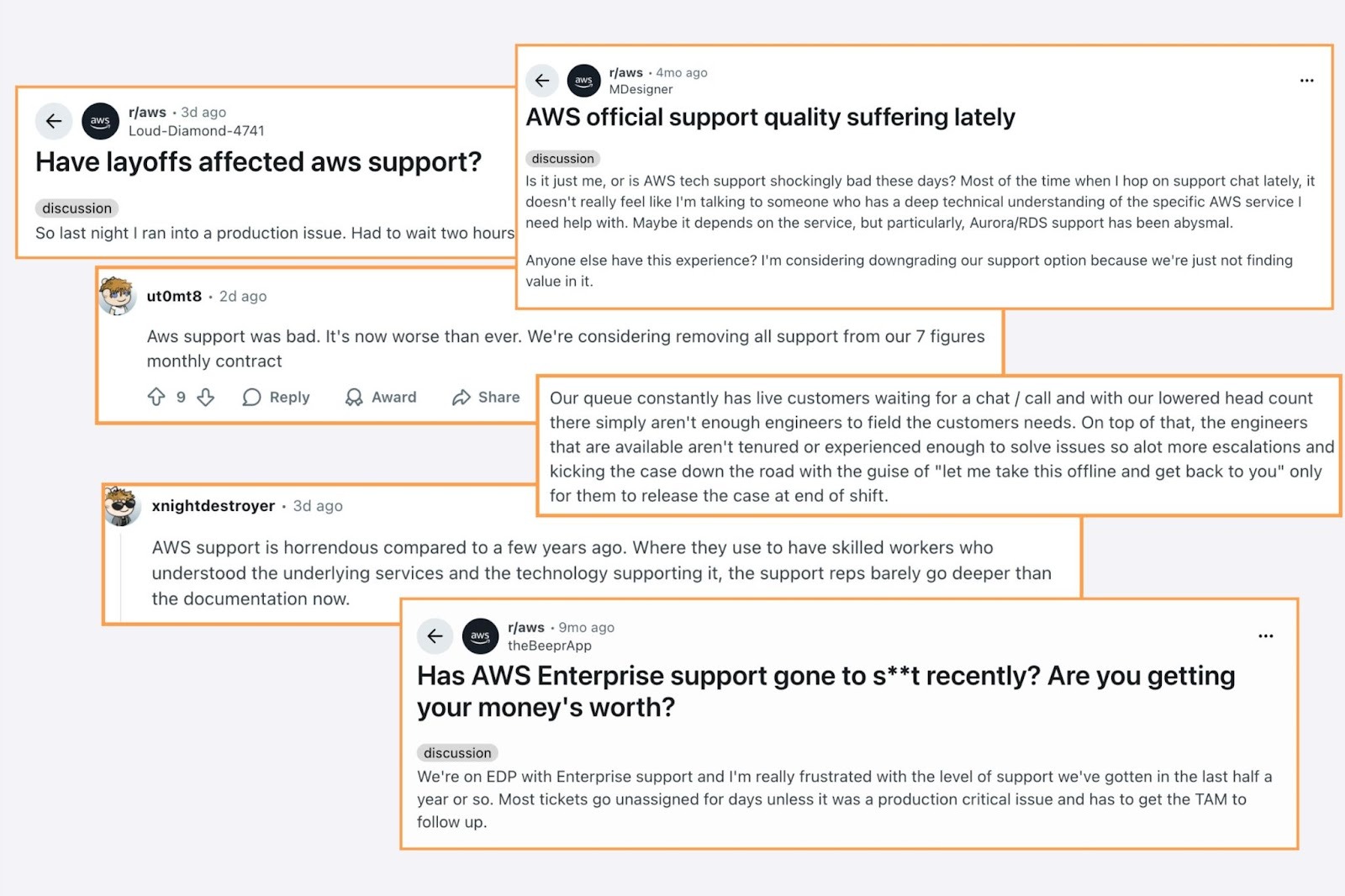
Large organizations are getting pinned in tight places assuming that the largest company will offer the best support. Guess where the top talent tends to go? Startups and innovators with streamlined focus on the technologies they compete on.
If you are looking for depth, expertise and operational excellence to support your Spark/Lakehouse workloads, Onehouse is already helping companies even at Fortune 10 scale. Onehouse has been quietly assembling a team of top Lakehouse talent from across the industry. Onehouse engineers have built and operated some of the largest data lakes on this planet. Being pioneers in the lakehouse industry, Onehouse also has a deep breadth of experience from over 2K+ community engagements in OSS, many of which are also AWS EMR customers. Because Quanton clusters are deployed BYOC style inside of your VPC our experts may even feel like an extension of your own data team.
Wrapping up
In this blog, we shared how the latest EMR release stacks up on our benchmarks with some color on the benchmarks and what it means for open table format performance in general. But, you don’t have to take our word for it. You can now measure it on your own workloads in less than 15 minutes!
Onehouse also developed a simple python tool, Cost Analyzer for Apache Spark™, which can analyze your EMR spark logs and identify bottlenecks or resource wastage in your jobs, specific to the workloads that you care about. It can run locally in your environment without sending any data outside and even gives you tips on how to accelerate your jobs. Within minutes, you can have a private and detailed report of how much money you might be leaving on the table. Available on pypi, you can simply run `pip install spark-analyzer` in your terminal:
If you want to try Quanton accelerated pipelines for yourself, You can start with our free Cost Analyzer for Spark or contact us for a free 30-day trial cluster today or visit https://www.onehouse.ai/product/quanton to get started.
If reading this made you lean forward — we’re hiring. At Onehouse, we’re tackling the hardest data infrastructure challenges: accelerating open table formats, reinventing the Spark runtime, and rethinking the data lakehouse around AI. We’re looking for world-class engineers who live and breathe distributed systems, query engines, and cloud-scale storage to help us push the limits of what’s possible. If building the future of data infrastructure excites you, come join us.

Read More:
.png)

Ray vs Dask vs Apache Spark™ — Comparing Data Science & Machine Learning Engines


Subscribe to the Blog
Be the first to read new posts